

Repeaters and remote admin
A repeater can be a source of its own, on a USB cable, or a node you manage over the mesh from a Companion source. This page covers both: what a Repeater source shows, its settings, the remote settings form, and the remote and local consoles.
What a Repeater Source Shows
A Repeater source talks to the repeater's text console over USB. It cannot send messages or traces, but it reads a good deal, and none of it costs airtime.
Stock repeater firmware gives you:
- Zero-hop neighbours in Nodes. MeshMonitor reads the repeater's
neighborstable every 5 minutes. Each entry that matches exactly one node MeshMonitor already knows (on any source) is listed with a Neighbour tag. - Local telemetry. The same poller that serves companions reads the repeater's
stats-core,stats-radio,stats-packets,clock,verandboardconsole verbs. Node Info shows health and graphs for the repeater. See Local-Node Telemetry. - The device console, the heartbeat probe and auto-reconnect.
A firmware build with packet logging on (-D MESH_PACKET_LOGGING=1) prints every frame the repeater hears, and MeshMonitor reads those lines. That adds:
- Nodes from adverts. Every advert the repeater hears becomes a node on this source, with its name, type and position. These nodes fire no automation trigger. New-node notifications are on for Repeaters but limited by a 48 hour learning period and a cap of 10 per hour (see Notifications).
- Hop counts. Each of those nodes records how many hops its advert took to reach the repeater (0 = heard direct). One advert usually arrives several times by different routes; the shortest one counts, and the node's next advert replaces it. A node whose advert has not been heard since the upgrade shows its hops as unknown.
- Packet Monitor. Each received frame is logged once you turn capture on. See Packet Monitor.
- Channel Messages. The repeater holds no channel keys, so MeshMonitor decrypts channel text (
GRP_TXT) with a key from any of your other MeshCore sources, or from a MeshCore entry in the Channel Database. These channels are read-only on the repeater source. A user sees a message only if they can read a channel that holds its key. - Trace SNR. Per-hop readings from traces the repeater overhears. See Trace SNR History.
On stock firmware the Nodes and Packet Monitor tabs say what is missing and why. Direct messages never appear on a repeater source: they are encrypted to their recipient. The Analyzer Observer still needs a Companion.
Repeater settings
When a Repeater source is connected, Configuration reads its settings through the console and lets you change them. Each save sends only the fields you changed, then reads them back. A field the repeater refused shows its own error.
| Setting | Range | Airtime effect |
|---|---|---|
| Location | lat −90…90, lon −180…180 | none; rides in the next advert |
| Zero-hop advert interval | Off, or 60–240 minutes | 1 transmission per interval; repeaters don't forward it |
| Flood advert interval | Off, or 6–168 hours (48 before firmware 1.12) | repeated by every repeater that hears it, up to 8 hops |
| Flood max | 0–64 hops | lower forwards fewer floods; 0 forwards none |
| Repeat | on / off | off stops all forwarding; nodes that rely on this repeater lose coverage |
| Airtime factor (af) | 0–9 | caps transmit duty at 1/(1+af); below 1 means more than 50% duty |
| RX delay, TX delay, direct TX delay | 0–20, 0–2, 0–2 | timing only; same packet count |
| Admin / guest password | 1–15 bytes / 0–15 bytes | none |
| Allow read-only | on / off | none |
The warning beside each interval shows the cost with this repeater's own radio settings. One advert is about 125 bytes, roughly 0.5–1.2 s on air depending on the preset. With flood adverts off, nodes beyond direct range only learn about the repeater when they hear it directly.
Passwords are write-only. MeshMonitor never reads the admin password and never shows the guest password; leave a field blank to keep it. After you change the admin password, saved remote-admin logins for this repeater stop working. The Clock section syncs the repeater's clock to the server; the firmware cannot move its clock backwards.
The danger zone on a Repeater offers reboot, power off (firmware 1.15 or later; the board stays off until someone power-cycles it), and private-key backup and restore (export from firmware 1.8, restore from 1.9). Power off and restore are for admins only and ask you to type the device name. A restore writes the key, then reboots; peers see a new node, and MeshMonitor records the expected key change in the audit log instead of raising a key-change alert. Companions get the same power off (firmware 14 or later) and the same admin-only restore.
All of these are console commands to the radio on its USB link; none of them transmit. Repeater passwords and keys never appear in MeshMonitor's logs.
Export / import. Export settings saves the values already on the form as JSON. It never includes passwords, and leaves out name, position and radio unless you tick Include name, position and radio. Import settings fills the form from such a file and skips anything this device can't take; nothing changes until you press Save.
Remote settings
From a Companion source you can read and change a remote Repeater or Room Server's settings with the same form, without typing commands. Open the node, log in as admin in its remote console, then expand Settings. You need the remote_admin:write permission on the source and a remembered admin login: the form never logs in on its own.
Every value is one encrypted message to the node and one reply, over the mesh. MeshCore has no way to read or write several settings in one message, so the form is careful with airtime:
- Nothing is read until you press Read on a group (Identity & radio, Adverts & forwarding, Access). Each group shows what the read costs before you press it.
- A save sends only the fields you changed, then reads those back.
- Commands go at least 1 second apart, one node at a time, at most 40 per source every 10 minutes.
- If a command gets no reply, the run stops. Fields it never reached show Not sent; fields sent before the stop show Sent, not verified. Nothing retries.
| Radio preset | Read 1 value, direct | Save 1 value | 15 values direct | 15 values over 3 hops |
|---|---|---|---|---|
| 62.5 kHz / SF7 / CR5 | 0.36 s | 0.44 s | 5.3 s | 22.5 s |
| 250 kHz / SF10 / CR5 (default) | 0.47 s | 0.58 s | 7.1 s | 30.8 s |
| 250 kHz / SF11 / CR5 | 0.86 s | 1.08 s | 13.0 s | 56.8 s |
| 62.5 kHz / SF8 / CR8 | 0.83 s | 1.08 s | 12.5 s | 54.0 s |
With no known path to the node, every message floods: each repeater that hears it sends it again. On a mesh with 50 repeaters that is 18–45 s of mesh airtime per value. The form warns when the path is unknown; learn the path first (a trace, or wait for an advert) when you can.
What the remote form offers differs from the local one:
- Identity & radio: name (1–31 bytes), position and TX power can be changed. Lowering TX power can cut the node off from you. The radio (frequency, bandwidth, SF, CR) is shown read-only, because a change needs a reboot and a wrong one strands the node.
- The admin password is not in the form; change it from the console with
password <new>. - A Room Server has no forwarding: repeat, flood max and the delays are hidden.
Each save writes one line per changed setting to the CLI history, with passwords masked.
Remote Administration
Added in 4.7
The MeshCore Remote-Administration console ships in 4.7 — gated on the new per-source remote_admin permission. See the internal architecture doc (docs/internal/dev-notes/MESHCORE_REMOTE_ADMIN.md in the repo) for the protocol-level architecture; this section is the operator-facing summary.
MeshCore's remote-admin protocol is CLI text sent as an encrypted DM — the same PAYLOAD_TYPE_TXT_MSG packet a chat message uses, distinguished by a single txt_type byte (CliData = 1 vs Plain = 0). The remote node dispatches the text into its CommonCLI::handleCommand handler and replies with one packet of text. MeshMonitor wraps the wire-level traffic behind two consoles.
Remote console (per contact)
For any Repeater (advType=2) or Room Server (advType=3) contact in your MeshCore source, the contact-detail panel surfaces a Remote administration section. The user with remote_admin:write on that source can:
- Log in with the node's admin password (or blank for guest access). Optionally tick "Remember this password" — see Credential store below.
- Send arbitrary CLI commands (e.g.
ver,stats,neighbors,set radio …) and see the reply inline in the transcript. - Click quick-action buttons that pre-fill the input for the most-common commands.
Rebootis flagged danger — see Danger commands below. - Read live stats in a structured panel (battery, queue, packet counts, air time, last SNR / RSSI) auto-refreshed every 30 s while logged in.
- Manage the ACL via a
setpermform: paste a 64-char hex pubkey, pick Remove / Guest / ReadWrite / Admin, click Apply. The built command (setperm <pubkey> <level>) lands in the same transcript as free-typed commands.
The login console renders for Repeater / Room Server advTypes. Companion contacts on firmware 1.18.0 and later use a login-free console instead (see Companion remote CLI). Replies are single-packet (≈130 – 180 byte MTU) and there is no chunking — long output is truncated at the firmware level.
Login timing and retries
A login to a repeater or room server can take a while on a busy mesh. MeshMonitor waits for a reply for twice the firmware's time estimate, but never less than 10 s and never more than 90 s. If a login gets no reply, the admin buttons try again, up to 3 attempts in all, with a 2 s pause between them. At the 10 s floor, three silent attempts take about 34 s; a slow path with a larger estimate takes longer, so give a reverse proxy a generous timeout.
MeshMonitor never retries when the node refuses the password. It shows the refusal at once, because sending the same password again cannot help.
Every login screen (remote console, contact details, direct messages and rooms) shows live progress, such as "Attempt 2 of 3: waiting for a reply (14 s left)". Click Cancel to stop the login.
Resuming a session
A repeater keeps you logged in until its client table fills up; there is no idle timeout, and an admin login even survives a reboot of the repeater. So MeshMonitor remembers each successful admin login, per source and per node, in its database. The record survives a MeshMonitor restart or upgrade. A guest login (blank password) is not remembered, because a repeater ignores commands from a guest; it also replaces any admin login remembered before it.
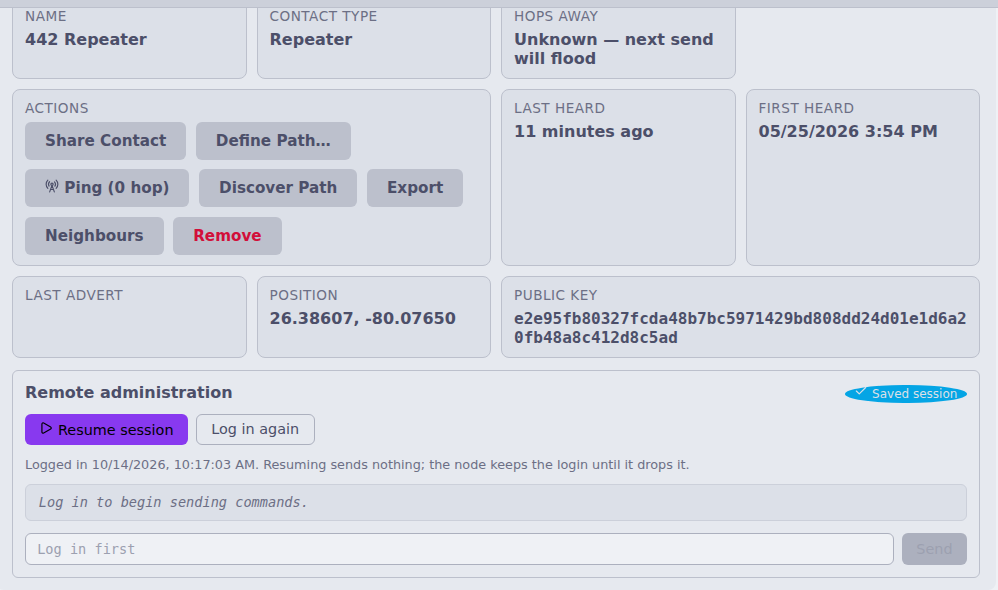
When you open the console and a login is remembered, it shows Resume session. Resume turns the console on without sending anything over the air. Log in again does a fresh login (with the saved password, or the password dialog when none is saved).
The console never logs in or resumes on its own. You always click.
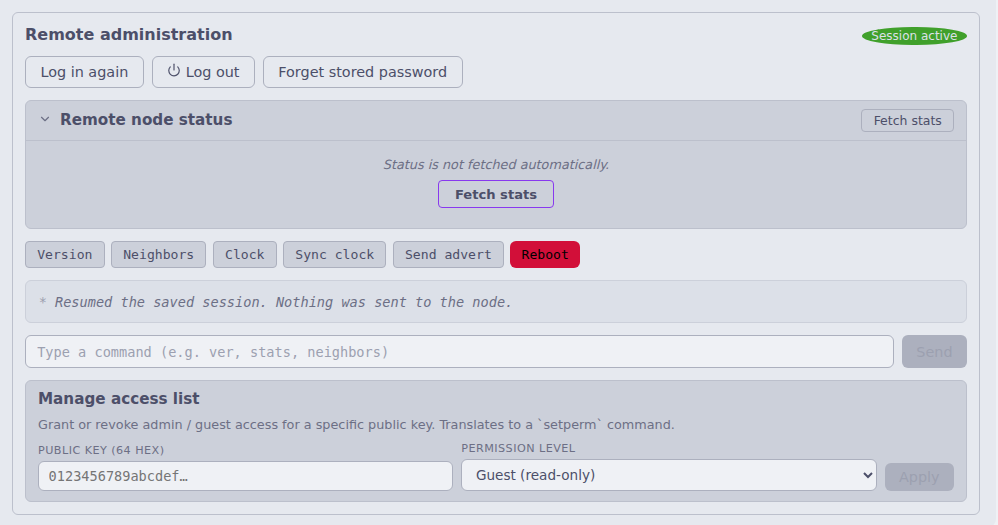
Log out forgets the remembered login on this server. It sends nothing to the node: MeshCore has no logout command, so the node keeps you in its table until it drops you or someone removes you with
setperm.A remembered login only counts for the radio that made it. If you swap the companion radio on a source, you need to log in again.
If the node has dropped you (for example it rebooted within a few seconds of your login, or its table filled up), it ignores your commands without a reply. The transcript then says "No reply. If the node rebooted or dropped the session, log in again." A single missed reply can also be a lost packet, so MeshMonitor keeps the record until you log in again or log out.
A refused password, or Forget stored password, also forgets the remembered login.
Scheduled jobs reuse the same record. A scheduled clock push to a repeater with a remembered login costs 2 packets (the command and its reply) instead of 4. If the repeater does not answer, MeshMonitor forgets the record, logs in once with the saved password and tries once more, then gives up until the next scheduled run.
Local console (Configuration view)
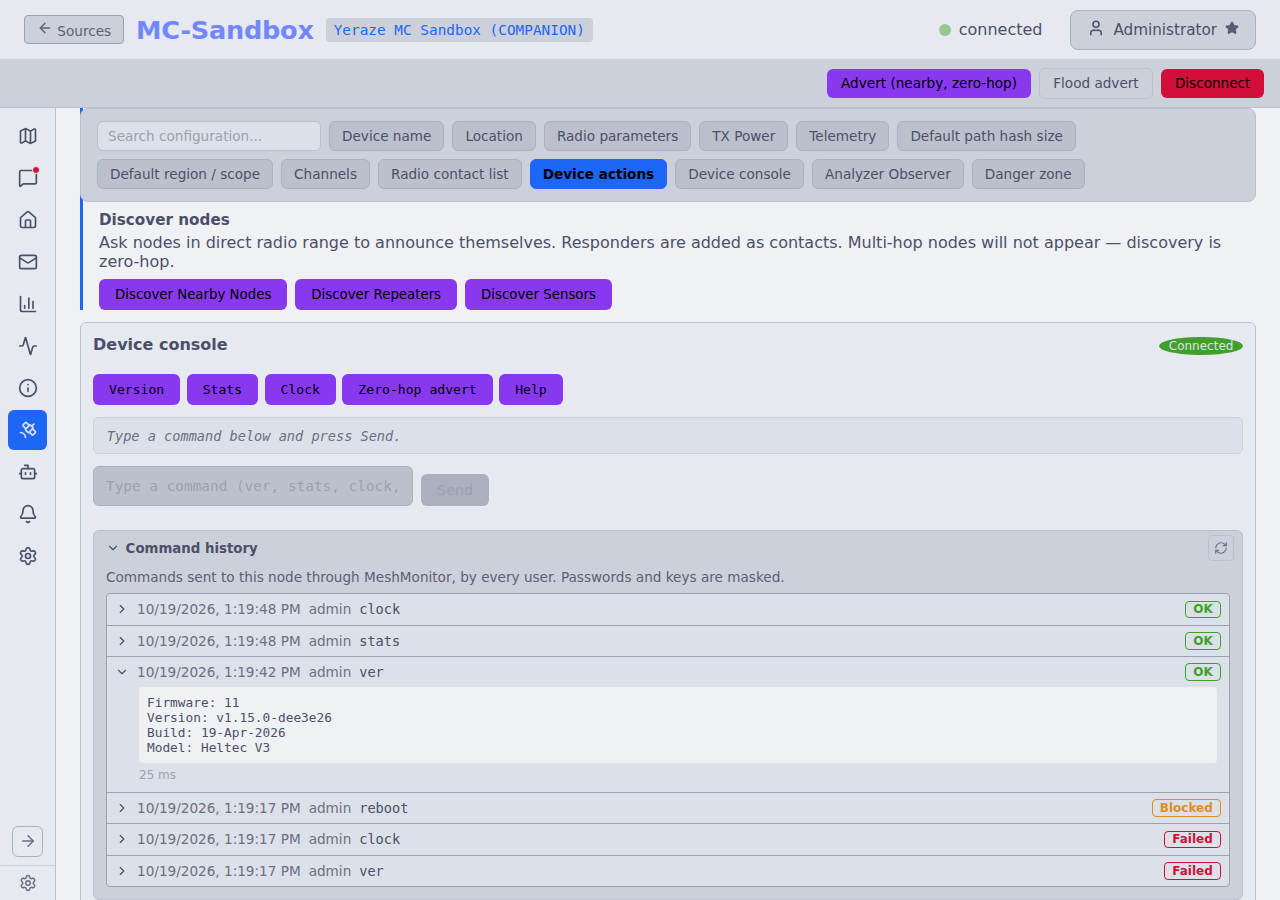
The Device Configuration tab gets a Device console for the locally connected node. Dispatch depends on the firmware:
| Local firmware | Console behavior |
|---|---|
| Repeater / Room Server | Forwards to the device's native serial CLI via sendRepeaterCommand. Same command set as a remote Repeater. |
| Companion, firmware 1.18.0 and later (protocol v14) | Sends each line to the firmware's own CLI (CMD_RUN_CLI_COMMAND) over the serial or TCP link. Nothing is transmitted. The firmware knows config get and set, ver, board, reboot and poweroff or shutdown. stats, clock, advert, advert.zerohop, help and version still use the interpreter below. Quick-action buttons: Version, Stats, Clock, Radio, TX power, Time zone, Zero-hop advert, Help and a danger Reboot. |
| Companion, older firmware | A small synthetic interpreter on the server side maps ver / stats [core|radio|packets] / clock / advert.zerohop / advert / help to existing companion-protocol bridge commands and formats the response as text. Mutating verbs (set name, set radio …) are intentionally NOT in the synthetic CLI — the existing form fields on the same Device Configuration tab handle those with proper validation. |
Companion remote CLI
Companion firmware 1.18.0 and later can also run CLI commands that another Companion sends over the air. There is no login. The target allows it for each contact:
- Allow this contact to run CLI commands on this radio (under Remote CLI in a Companion contact's details, needs
configuration:write) sets flag0x10on that contact in your radio. It needs protocol v14 and a contact the radio holds. MeshMonitor reads the flag back from the radio after each change. - A Companion contact then gets a remote console that needs Remote admin: write on the source. It uses the same danger guard and rate limit as the repeater console. A target that has not allowed your radio stays silent, and the console says so when the reply times out.
- Allowing a contact lets it run any command on your radio, including reboot and radio settings, and each command makes your radio reply over the air. MeshMonitor cannot limit this.
- A CLI command from a contact you have not allowed is logged and dropped. MeshMonitor does not store it as a direct message.
No login flow: the connection is physical (USB serial or direct TCP), so there's no admin password concept. Gated on the existing configuration:write permission.
Credential store
When the user ticks "Remember this password" at login, the plaintext is encrypted with AES-256-GCM using a key derived from SESSION_SECRET via HKDF and stored in meshcore_nodes.adminCredential (added by migration 070). Each envelope includes a 4-byte kid fingerprint of the current secret; on later visits the console offers a one-click Log in with saved password button when kid matches (it never logs in by itself). If SESSION_SECRET rotates, the mismatched kid triggers a yellow banner asking the user to re-enter the password — never a silent auth-tag failure.
Capability gating
When SESSION_SECRET was auto-generated rather than explicitly configured, the "Remember password" checkbox is disabled with a tooltip explanation. Persisting against an ephemeral key would lose every saved password on every restart, which is worse than re-prompting. Set SESSION_SECRET=$(openssl rand -hex 32) in your environment to enable credential persistence.
Security boundary: the credential store defends against a DB-file-only exfil (someone grabs meshmonitor.db without the host environment). It does not defend against a host compromise — anyone running code on the host has SESSION_SECRET and the DB. Same posture as the existing channel-PSK storage. The plaintext password never leaves the server process: the auto-login route reads the encrypted envelope, decrypts in-process, and calls loginToNode(pubkey, plaintext) without echoing the password to the client. A test canary in meshcoreRoutes.test.ts walks every audit-emitting login code path and asserts the plaintext is absent from each response body and audit row.
Danger commands
Destructive verbs matching /(reboot|erase|clkreboot|factory)/i are gated by a typed-name confirmation modal: the user must type the contact name (or local device name) exactly to enable the Confirm button. The same regex is mirrored server-side — POST /admin/cli and POST /cli both reject without confirm: true in the body with code: DANGER_CONFIRM_REQUIRED. Mirrored deliberately so a script bypassing the modal still gets the prompt-as-requirement.
Audit log
Every CLI command, login outcome, and credential mutation writes an audit_log row through a new auditMeshcoreEvent helper. Distinct action values per outcome:
| Action | When |
|---|---|
meshcore_remote_login / _failed | manual /admin/login success / auth failure |
meshcore_remote_login_saved / _failed | auto-login via saved credential (failures carry the specific code) |
meshcore_remote_cli / _failed / _blocked | per-CLI command on a remote node |
meshcore_local_cli / _failed / _blocked | per-CLI command on the local node |
meshcore_credential_forget | DELETE /admin/credentials/:pubkey |
meshcore_message_sent_as / _denied | channel send under an API sender name (no text stored) / refused attempt (#6282) |
meshcore_sender_names_updated | the per-source sender-name list changed (#6282) |
The details JSON captures sourceId, publicKey (where relevant), the command text, reply length, and elapsed milliseconds. MeshMonitor masks passwords and keys in the command text before it stores it (see CLI command history). The plaintext password never appears in audit details, verified by the canary test referenced above.
CLI command history
MeshMonitor records every CLI command a person sends through it, with a timestamp, and shows the list in the consoles and on the Audit Log page.
What it records. Commands from four places:
- The remote console, including the Companion remote console.
- The local console.
- The time-sync button (stored as
clock sync). - A Virtual Node app that relays a CLI command. These rows show
vn:<client>as the user, and the app's IP address.
Background use is not recorded: stats and neighbor polls, config refreshes, the time-sync scheduler and automations.
Outcome. Each row shows OK, Blocked (the danger guard or receive-only mode stopped it, and nothing was sent), Failed or Timed out, with the reply or error and the time taken.
Where to see it.
- The Command history panel under the input of the Local, Remote and Companion remote consoles. Click a row to see its reply. Load more pages back.
- The MeshCore CLI activity tab on the Audit Log page, across every source you can read, with filters for source, target, user and date range.
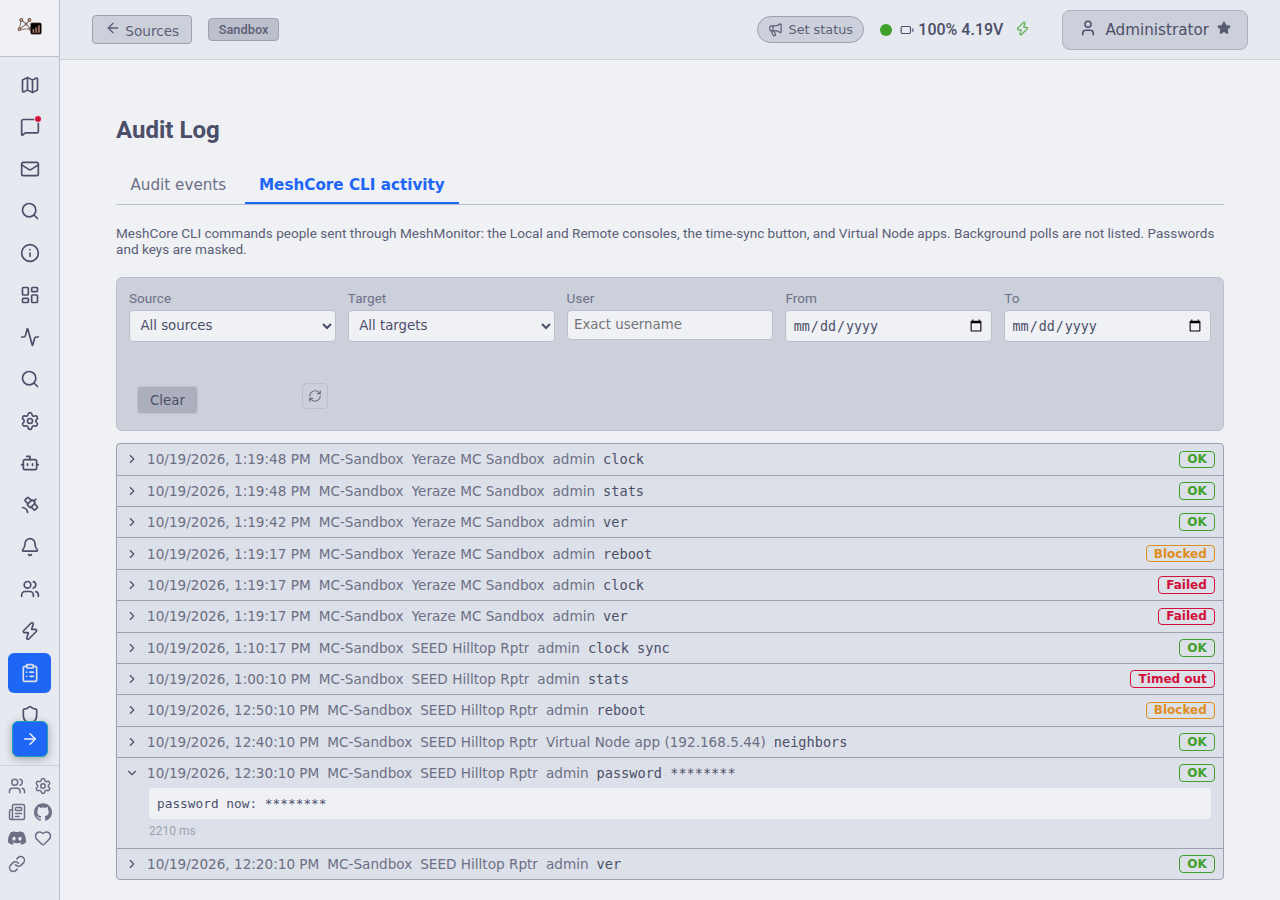
Permissions. Remote rows need remote_admin:read on the source. Local rows need configuration:read. Admins see all rows.
Redaction. MeshMonitor masks passwords and keys in commands and replies before it stores them, in the history and in the audit log. It masks the argument of password, passwd and login, the value of set for any password, key, PSK or secret setting (such as set guest.password or set prv.key), and the reply to get of those settings. The radio still receives the real text.
Retention. The nightly database maintenance deletes history older than MeshCore CLI History Retention (default 90 days, range 7 to 365). See Settings.