

SPIP Pixel Images
MeshMonitor draws Small Packet Image Protocol 1.0 (SPIP1) messages as pixel images, in channel and direct message views for both Meshtastic and MeshCore.
SPIP packs a small image into one text message, so it costs no more airtime than any other message. Use the SPIP editor to draw one, then paste the code into the message box.
Format
A SPIP message is <columns>:<pixels>, one character per pixel, row by row:
| Characters | Meaning |
|---|---|
a–x | 24 colours: 8 full, 8 lighter, 8 darker |
y, z | Black, white |
1–9 | Greys, dark to light |
0 | Reserved |
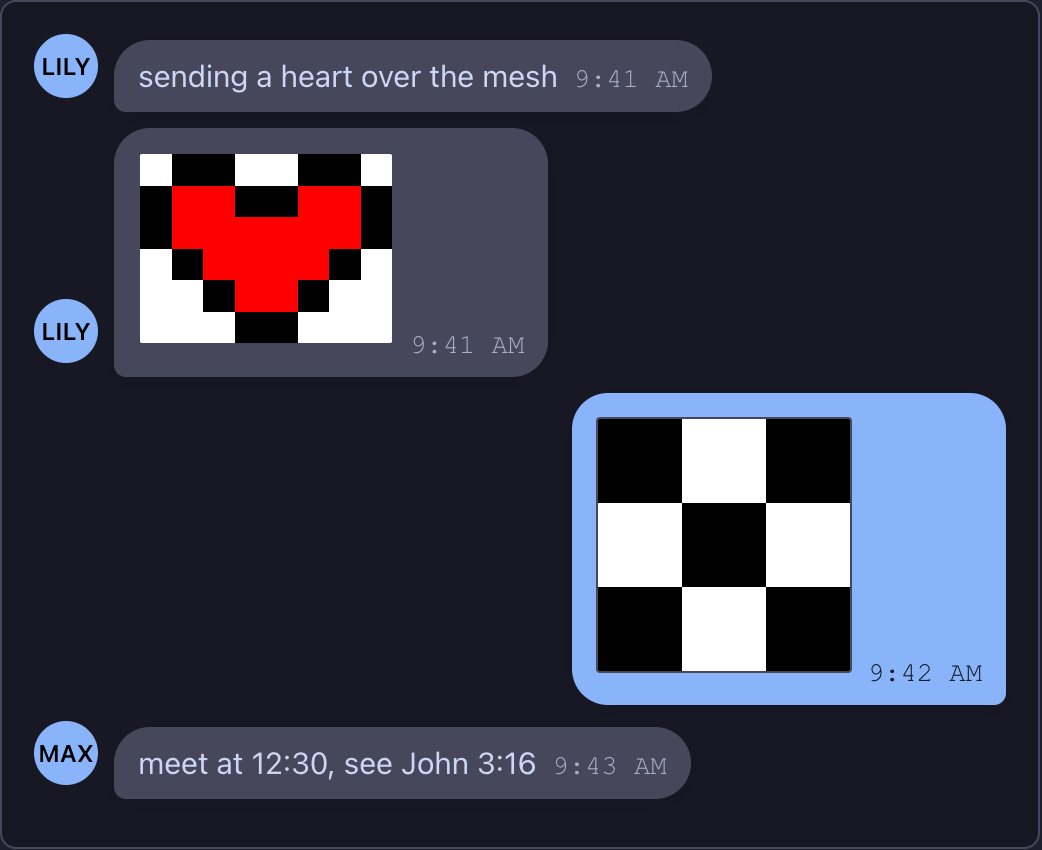
Case is ignored. For example, 3:yzyzyzyzy is a 3×3 black-and-white checkerboard, and 8:zyyzzyyzyaayyaayyaaaaaayzyaaaayzzzyaayzzzzzyyzzz is a red heart.
When a message is drawn as an image
So that ordinary chat such as 12:30 or John 3:16 stays as text, a message is drawn as an image only when:
- the whole message is the code, with nothing before or after it;
- it has 2 to 32 columns and at least 2 rows;
- the pixels fill whole rows, and there are no more than 1,024;
- every pixel is a valid SPIP character.
Anything else shows as plain text. Hover over an image to see its code.