
Configure a MeshCore source
Device settings, backups, telemetry, the radio's contact list, per-source settings, permissions and the API for a MeshCore source. To add a source first, see Set up a MeshCore source. Repeater settings are on Repeaters and remote admin.
Device configuration
The Device Configuration tab is where you change the device's settings:
- Identity — Name and advert
- Location — Position and advert-location policy. Type the coordinates or click the map to drop a pin (drag it to move it, or use Use this device's location), then press Save location.
- Radio — Frequency, bandwidth, spreading factor, coding rate (now with a preset selector)
- Telemetry mode — Which telemetry classes the device emits (see Telemetry Modes)
- Default path hash size and Default region / scope — separate sections after Telemetry
- Radio contact list and Device actions — contact list, adverts, and node discovery
- Bluetooth PIN (Companion) — keep the firmware default (
0) or set a fixed six-digit PIN (100000–999999). The radio applies it at the next boot, and only Bluetooth builds use it. - Multi-ACKs (Companion, firmware 1.7.4 or later) — on or off. When on, the radio sends one extra ACK for each direct message it receives, and every hop on the return path repeats it: about one extra transmission per hop per DM. Leave it off on a busy mesh.
- Factory reset (Companion, firmware 1.7.3 or later, admins only) — in the danger zone. Type the device name to confirm. It erases the identity key (the node gets a new public key, so peers lose it), every setting, all channels, the contact list and the WiFi credentials, then reboots. MeshMonitor keeps its own history and records the new key in the audit log instead of raising a key-change alert. Export the private key first if you may want it back. On a WiFi or TCP source you may lose network access to the radio.
Share a channel
Each channel card has a Share button. It shows a QR code and a link in the format the MeshCore app accepts:
meshcore://channel/add?name=<name>&secret=<32 hex chars>[®ion_scope=<scope>]The link includes the channel secret, so sharing needs Configuration: write on the source. Import from URL in the channels header reads such a link, shows the name, a masked secret, the scope and the target slot, then writes it to the lowest free slot (never slot 0). If the radio already has that secret, it reports the existing slot instead. A hashtag channel link may leave out the secret; MeshMonitor derives it from the name. See the MeshCore QR code reference.
Radio Configuration
Use the Configuration view's Preset dropdown to pick from the official MeshCore preset list, or choose Custom to manually set:
- Frequency (137–1020 MHz)
- Bandwidth (7.8 to 500 kHz)
- Spreading Factor (5–12)
- Coding Rate (4/5 to 4/8)
DANGER
Changing radio parameters will disconnect you from nodes using different settings. Make sure all nodes in your mesh use the same radio configuration.
A save reports any error from the device, then reads the settings back, so the form shows what the radio holds.
Companion Backups
A MeshCore Companion source has the same Backup section as a Meshtastic source, on its Configuration page. Each source has its own files, schedule and retention (see Device Configuration Backup for the permissions and file rules). Repeaters and Room Servers have no backup section; use their settings export instead.
What a backup holds
- The device name, radio parameters (frequency, bandwidth, spreading factor, coding rate), TX power and coordinates
- The "other parameters": the manual-add flags, the three telemetry sharing modes, the advert location policy, and multi-ACKs when it is 0 or 1
- Auto-add options, the default path hash size and the BLE PIN (when the radio reports one)
- Every configured channel slot with its secret key, and each channel's region scope
- A fixed set of MeshMonitor settings for the source: default region, default path hash size and "respond to discovery"
A backup never contains the radio's private key or its contacts. To bring an identity back, use Private key import in Device Management. The file is plain YAML, so treat it as a secret: it is saved with mode 0600, kept out of system backups, and downloading it needs configuration:write on the source.
Creating a backup
Creating a backup reads the radio over its local serial or TCP link. Nothing is transmitted over the air. It needs a connected Companion. Scheduled backups skip a source that is offline or busy with a restore.
What a restore changes
A restore runs best effort, one section at a time, and reports what failed or was skipped. It also never transmits. The order is: name and coordinates, other parameters, auto-add, path hash size, BLE PIN, channels, the MeshMonitor settings, TX power, and the radio parameters last.
- The radio applies at once. If the backup is for another frequency or preset, the node leaves its mesh until you change it back. The confirmation shows the current and the backup radio side by side and warns when they differ.
- TX power is limited to what the connected radio supports. When it is clamped, the result says so; when the radio's maximum is unknown, TX power is skipped.
- Channels: only the slots in the backup are written. Slot 0 (reserved) is never written, slots past the radio's capacity are skipped, and every other slot stays as it is. Overwriting a slot changes which channel that slot's message history, notification rules and
channel_Npermissions refer to, the same as editing the slot by hand. - BLE PIN: a changed PIN takes effect after the radio's next boot.
- Multi-ACKs above 1 is not restored (airtime cost), and it is skipped on firmware older than code 7.
- Identity: the restore compares the file's public key with the connected radio. A different key is flagged but does not block, so you can restore settings onto a replacement or freshly reset radio. The radio keeps its own identity.
Telemetry
MeshMonitor collects three kinds of telemetry from MeshCore sources, all written into the same telemetry table the Meshtastic side uses (just with mc_* type names) so the graphing UI works the same way.
Local-Node Telemetry
A module-level singleton polls every connected companion every MESHCORE_TELEMETRY_INTERVAL_MS (default 5 minutes). It calls GetStats core / radio / packets, GetDeviceTime, and DeviceQuery — none of which transmit on the air — and writes batched rows stamped with sourceId and prefixed mc_. tx/rx duty-cycle and packet rates are computed as deltas vs the prior sample.
A directly attached Repeater source is polled on the same timer. MeshMonitor reads the repeater's serial console (stats-core, stats-radio, stats-packets, clock, ver, board) and writes the same mc_* rows. These are local serial reads, and none of them transmits. The repeater's clock reply gives hours and minutes only, so clock drift is measured to the minute. The one-click time sync on Node Info stays Companion-only.
This drives the Node Info view.
Telemetry Modes
You can choose which telemetry classes the device shares over the air:
- Basic telemetry — battery, voltage, uptime
- Location telemetry — position
- Environment telemetry — environmental sensors (where the hardware has them)
Each one takes Always, Device only or Never. Set them in Device Configuration; the companion stores them.
Per-Node Remote Telemetry
Each row in meshcore_nodes can opt in to periodic req_telemetry_sync requests with a per-node interval. The remote-telemetry scheduler walks every registered manager every MESHCORE_REMOTE_TELEMETRY_TICK_MS (default 30s), picks at most one most-overdue eligible node per source, decodes the LPP response, and writes mc_<lpp-type-name> rows into the same telemetry table.
A global 60-second minimum spacing between any two scheduled mesh ops on the same source is enforced through MeshCoreManager.lastMeshTxAt, so future scheduled operations on the same manager (auto-traceroute, periodic adverts, etc.) coordinate against a single field instead of each owning their own throttle.
You configure this from the contact-detail panel in the Node Details view:
- Open the DM with the target contact
- Open the contact-detail panel
- Toggle Remote telemetry on
- Set the interval (minutes)
- Save
The config requires configuration:write on the source. Read-only users see the panel with controls disabled and a banner explaining why.
On-demand polling
Alongside the scheduled config, the panel has two buttons to pull telemetry from a node right now instead of waiting for its interval:
- Poll Status — requests battery / uptime / counters (repeater- and room-server-oriented).
- Poll Environment (LPP) — requests a Cayenne-LPP environment reading (companion-oriented).
Both transmit on the mesh, so they share the per-source 60-second mesh-TX gate — if another scheduled or manual op fired too recently the request is refused with HTTP 429 and a Retry-After, surfaced as a throttle message on the button. Each button shows a pending state and reports how many telemetry rows were written. On-demand polling requires only nodes:read on the source (and returns 409 if the source isn't connected).
The composite primary key on meshcore_nodes is (sourceId, publicKey), so the same device advertising under two different sources is tracked independently.
Node Display: hide incomplete nodes and map dimming
The Node Display section of the MeshCore Settings tab also holds two per-source options that follow the Meshtastic ones. Both save with the source you are viewing and need settings:write on it.
- Hide Incomplete Nodes hides nodes that have no advertised name, or whose device type is unknown, from both the Nodes list and the map. Favorites and your own node always show.
- Dim old nodes on the map fades map markers as a node goes quiet. A marker is fully opaque until Start dimming after (hours), then fades in a straight line down to Minimum opacity at the end of the node's age window. That window is Maximum Age of Infrastructure Nodes for Repeaters and Room Servers, and the Node list & map window for everything else. Only map markers dim; the Nodes list does not. With a window of 0 (show all), nothing dims. Your own node never dims.
Telemetry settings and cleanup
The MeshCore Settings tab has two telemetry controls, both scoped to the source you are viewing.
- Telemetry section: Telemetry Visualization (Hours) (1-168) sets the graph window, and Favorite Telemetry Storage Length (Days) (7-90) sets how long favorited telemetry is kept. They save per source, so they never change another source. A source with no saved value follows the global default set on the Meshtastic side. Saving needs
settings:writeon the source. - Telemetry data section (admins only): Purge telemetry (this source) deletes the stored telemetry of this source and leaves every other source alone. Clean outliers... opens the outlier dialog for this source to preview and remove bad readings for one metric.
Radio contact table vs MeshMonitor
A MeshCore companion radio and MeshMonitor each keep their own list of nodes, and the two can drift apart:
- MeshMonitor's node list holds every node MeshMonitor has heard about on this source: adverts, messages, packets, and contacts read from the radio. Favourites live here.
- The radio's contact table is stored on the device itself and holds a limited number of contacts (the firmware reports the limit). The radio can only log in to, poll telemetry from, request status from, or message a node in this table. A node missing from it fails at once; nothing goes on the air.
Auto-add contacts
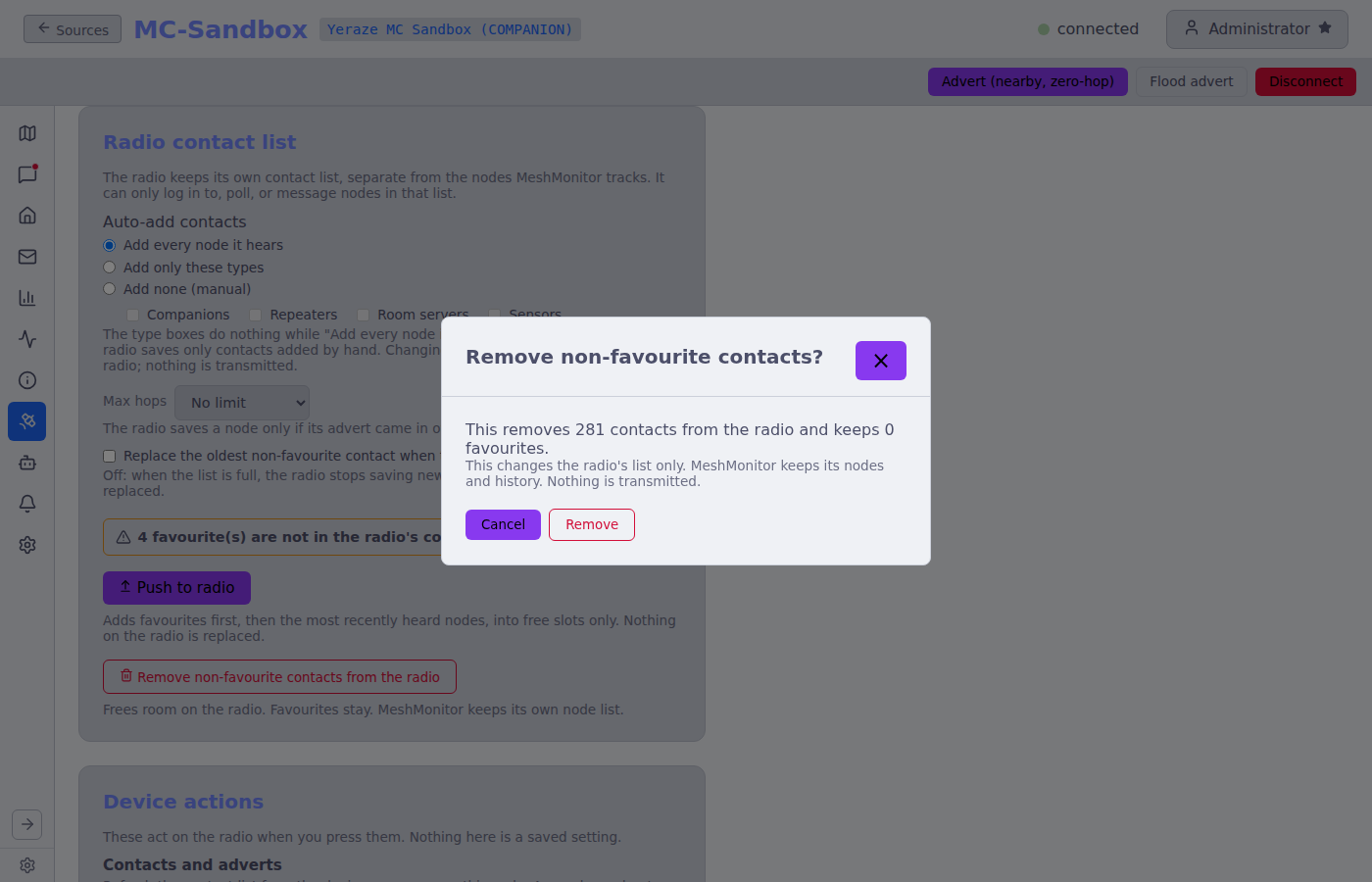
The radio has three ways to treat the nodes it hears. Pick one in MeshCore → Device Configuration → Radio contact list (needs configuration:write):
- Add every node it hears (the usual default): the radio saves each node that adverts, until the table fills. The type boxes are ignored in this mode.
- Add only these types: the radio saves only the types you tick: Companions, Repeaters, Room servers, Sensors.
- Add none (manual): the radio saves only contacts added by hand. Nodes it hears still show up in MeshMonitor, but the radio never saves them.
Two more options apply to the first two modes:
- Max hops: the radio saves a node only if its advert came in over that many hops or fewer. No limit, Direct only, or up to 1 to 8 hops (the radio can hold values up to 64; one set elsewhere stays in the list).
- Replace the oldest non-favourite contact when the list is full: off by default. Off, a full radio stops saving new nodes. On, it drops its oldest contact that is not a favourite to make room.
These write settings to the radio over the serial or TCP link. Nothing is transmitted. Each change sends only the field you changed; the radio's other bits (and the telemetry and advert-location settings that share a firmware command) stay as they were. Firmware too old to know these options shows This firmware does not support auto-add options; the older on/off toggle still works there.
What "favourite" protects
A contact is a favourite when the radio's favourite flag is set or MeshMonitor marks the node as a favourite. Favourites are never replaced by the option above and never removed by the bulk remove below. Marking a node as a favourite in MeshMonitor also sets the flag on the radio.
Remove non-favourite contacts
Remove non-favourite contacts from the radio (needs nodes:write) frees room on a full radio. A dialog shows how many contacts it will remove and how many it keeps. It then removes them one at a time from the radio's table and shows Removed N, kept N, failed N. This changes the radio's list only: MeshMonitor keeps its node rows and history, and the nodes come back on the radio the next time they advert (or with Push to radio). Only one run can go at a time. A local write; nothing is transmitted.
Symptoms when the two are out of step
- MeshMonitor shows the node, even marked as a favourite, but logging in to it is refused with "not in the radio's contact list".
- Telemetry and status requests to it do nothing, while the radio still hears its adverts.
- The server log at connect says
N locally-favourited node(s) not in the device contact table. When auto-add is off the message says so. - The Device Configuration page shows a banner: N favourite(s) are not in the radio's contact list.
Two fixes
- Turn auto-add on. The radio then stores nodes as it hears their next advert. Nodes it already missed come back only when they advert again.
- Push to radio. The Push to radio button in the same section (needs
nodes:write) copies MeshMonitor's nodes into the radio's table straight away, in this order: favourites first (most recently heard first), then the other nodes by most recently heard. It fills free slots only: it never replaces a contact already on the radio. It skips the local node, nodes whose type is not known yet (wait for an advert), and nodes on the Ignore / Block list. If the radio's capacity can't be read, it pushes favourites only. A summary lists what was added, what was already there, what was skipped and why, and how many free slots remain. Like auto-add, this is a local write; nothing is transmitted. If the radio is full, turn on replacing the oldest contact or remove non-favourite contacts first.
To add a single node, open it in Node Details and use Add to radio on the "Not in the radio's contact list" notice.
Per-Source Settings
Alongside the receive-only toggle, MeshCore Settings and Device Configuration expose a small set of per-source controls that shape how MeshMonitor talks to the mesh through that specific source:
- Default path hash size (on Device Configuration) — how many bytes each hop's hash takes in the path of the messages you send. 1 byte (256 values) is enough for a small mesh. 2 bytes, the recommended choice, avoid hash collisions that drop packets on a mid-size or large mesh. MeshMonitor applies it to the device at once and again on each reconnect.
- Maximum infrastructure node age (hours) — a separate age window for repeaters and room servers. The main Node list & map window setting applies to all MeshCore nodes; this second slider lets you keep infrastructure nodes on the map for longer than mobile companions. Two views honor it: the map's node-list, and the neighbours summary. Set it to
0to inherit the main age window. - Telemetry time window — the telemetry panel in a MeshCore node's details view exposes a time-window selector so you can flip the charts between the last hour, day, or week without leaving the panel.
Permissions
In 4.5 the global meshcore permission is gone. Migration 058 expanded every legacy meshcore grant into the per-source resource set, matching how Meshtastic resources are scoped:
| Resource | Scope | Description |
|---|---|---|
connection | Per-source | Connect/disconnect, status, the Node Info tab |
configuration | Per-source | Identity, radio, telemetry mode, location, per-node remote-telemetry config |
nodes | Per-source | Node list, contacts, map data. nodes:write covers favorites, Discover Path, the location override and Push to radio |
messages | Per-source | Read and send DMs / channel messages; resend a channel post |
channel_0 to channel_7 | Per-source | Read one channel slot without full messages:read |
traceroute | Per-source | traceroute:read shows Trace SNR history. traceroute:write lets you run Trace Path and clear one link's Trace SNR history |
packetmonitor | Per-source | Read the Packet Monitor. Clearing its log is for administrators |
remote_admin | Per-source | The remote console for repeaters and room servers |
automation | Per-source | The Automations tab |
dashboard | Global | The Telemetry tab |
settings | Per-source | The Settings tab |
Each tab in the source's sidebar shows only when you hold the matching read grant (on that source, for a per-source resource). The Notifications tab needs a signed-in user, since its preferences are per user.
Anonymous users can view MeshCore data on sources where the anonymous user has the relevant *:read permission. Changing config and toggling remote telemetry require configuration:write; sending messages requires messages:write.
UI Permission Gating
Write controls in the MeshCore UI are now disabled in place for users without the right permission — not just rejected on submit. The Configuration view, Channels view, DM compose box, and remote-telemetry toggle all dim themselves and surface an explanatory banner, mirroring how the Meshtastic side handles permission gating.
See Per-Source Permissions for the full model.
API, metrics and embeds
- The v1 API reads MeshCore nodes, messages, channels, packets, traces and network data, and can send messages. See the API reference (section "MeshCore sources on v1").
- The Prometheus endpoint exports MeshCore gauges, including a per-payload-type packet count. See the API reference (section "Get Prometheus Metrics").
- Embed maps draw MeshCore neighbor links and trace paths. See Embed Maps.
The aggregate dashboard map and /api/nodes endpoint enumerate every connected MeshCore manager and include contacts that have valid (latitude, longitude) (zeros are rejected). Each contact gets a synthetic nodeId of mc:<sourceId>:<pubkeyPrefix> so cross-source duplicates don't collide on React keys, and getNodeLatLng resolves either the flat {latitude, longitude} shape or the nested position shape.