

Traffic Management
Traffic Management is a Meshtastic firmware module. It runs on the node, looks at each packet the node hears, and drops some of them before the node relays them. MeshMonitor does two things with it: it edits the module's settings (under Device Configuration → Traffic Management), and it can estimate what a tighter setting would drop from the packets the node has already let through.
MeshMonitor does not police any traffic itself. All dropping happens in the node's firmware.
A dropped packet is gone
When the module drops a packet, the node does not relay it and does not hand it to its client. MeshMonitor is that client, so it never sees a dropped packet: not in the Packet Monitor, not in messages, not on the map. On a router, a drop also removes that packet for every node that relies on the router to hear it.
Everything on this page was checked against the firmware source, src/modules/TrafficManagementModule.cpp, at tags v2.8.0.47db0e3, v2.8.0.7239fe8 and v2.8.1.8e6a88d and on develop (October 2026). The four rules below are the same in all of them. The module is not on the master branch, so no 2.7 release has it.
Settings reference
The settings live under Device Configuration → Traffic Management, grouped as they appear in the UI.
Non-zero enables, 0 disables
Traffic Management has no on/off checkboxes. Every setting is a number: a non-zero value turns a feature on, and 0 turns it off.
The module itself is on by default on every board that carries it (all but the smallest STM32WL boards). A 2.8 node that has never been configured starts with Position Deduplication at 18,000 seconds (5 hours) and every other rule at 0.
The module checks the rules in a fixed order, and the first rule that matches ends the packet: unknown packets → NodeInfo direct response → position dedup → rate limit.
Position dedup and rate limit never apply to a packet the node sent itself, or to a packet addressed to the node.
Position Deduplication
Drops a repeat of the same position from the same node.
- Minimum Interval (seconds) — a position is dropped when it falls in the same grid cell as the last position the node let through from that sender, and that one passed less than this long ago. 0 disables position deduplication.
What the firmware does with the number:
- It only looks at POSITION packets on a well-known channel: a channel with the default key (or no key) whose name is a modem preset name such as
LongFast. A private channel is never deduplicated. - It counts time in 6 minute ticks. The interval is divided by 6 minutes and rounded down, with a minimum of one tick, so any value under 12 minutes acts as 6 minutes. The largest window is 255 ticks (25.5 hours).
- The window runs from the last position that passed. A dropped repeat does not restart it, so a parked node gets one position through per window.
- A sender with the TRACKER or TAK_TRACKER role may repeat after 1 hour at most, and a LOST_AND_FOUND sender after 15 minutes, whatever the interval. These are caps: they never lengthen a shorter interval.
- The grid cell comes from the channel's own Position Precision setting, capped at 15 bits on a well-known channel. If the channel has no precision set, the module uses 19 bits (about 90 m cells). The module keeps only an 8-bit fingerprint of the cell, so two far-apart cells can, rarely, look the same.
- An interval under 90 seconds barely works: the node's once-a-minute cache cleanup forgets the sender each time it runs.
NodeInfo Direct Response
Lets the node answer a NodeInfo request for another node from its own cache, instead of relaying the request.
- Max Hops (0–7) — the node answers when the requester is at most this many hops away. 0 disables direct response.
What the firmware does with the number:
- The node's role sets a hard ceiling. A ROUTER, ROUTER_LATE or CLIENT_BASE node answers up to 3 hops away at most. Every other role answers only requesters it hears directly (0 hops), whatever value you enter.
- It only answers a unicast request that wants a response and is addressed to some other node. The request is then not relayed.
- It only answers for a node it heard a NodeInfo from in the last 6 hours.
- Replies are throttled: one per second overall, and one per minute per requester and per target.
Rate Limiting
Throttles a node that sends too much.
- Window (seconds) — the length of the counting window.
- Max Packets Per Window — how many packets one sender may get through per window. The rest of that window's packets are dropped.
Rate limiting runs only when both values are non-zero.
What the firmware does with the numbers:
- It counts per sender, across all packet types, not per port. Only ROUTING and ADMIN packets are exempt (not counted, never dropped).
- It only counts packets the node could decode. A packet on a channel the node has no key for is not counted.
- A position that Position Deduplication already dropped is not counted.
- It counts time in 5 minute ticks: the window is divided by 5 minutes, rounded down, and clamped to 1–15 ticks. So any window under 10 minutes acts as 5 minutes, and 75 minutes is the longest.
- The window is fixed, not sliding. It opens with a sender's first packet and closes at a tick edge; the next packet opens a new one. A burst that straddles the edge can pass up to twice the limit.
- Max Packets is capped at 60. A larger value acts as 60.
- A window under 150 seconds barely works: the once-a-minute cache cleanup zeroes the count each time it runs.
Drop Unknown Packets
Drops packets the node cannot decode, once one sender has sent too many.
- Unknown Packet Threshold — how many undecodable packets one sender may send before further ones are dropped. 0 disables it.
What the firmware does with the number:
- The window is a fixed 5 minutes. It is not the Rate Limiting window.
- The threshold is capped at 60.
- "Unknown" means the node could not decrypt or decode the packet: usually a channel it has no key for, or a direct message between two other nodes. On a busy mesh with private channels this is ordinary traffic.
State lives in RAM
The module remembers senders in a small cache (250 to 2,048 entries, by board) that runs on the node's uptime clock. A reboot clears it, and when it fills, the oldest sender is forgotten. After either, that sender's next repeat or burst passes as if it were the first.
Settings that used to be here
Meshtastic protobufs commit d4f7ddb1 removed nine fields from TrafficManagementConfig and reserved their tags, because none of them had shipped in a stable release:
| Removed setting | What replaced it |
|---|---|
| Enable Traffic Management | Nothing to set: the module is on by default |
| Position Dedup → Enable | Minimum Interval > 0 |
| Position Dedup → Precision Bits | The channel's Position Precision setting |
| NodeInfo Direct Response → Enable | Max Hops > 0 |
| Rate Limiting → Enable | Window and Max Packets both > 0 |
| Drop Unknown → Enable | Unknown Packet Threshold > 0 |
| Exhaust Hop Limit on Relayed Telemetry | Removed — shelved in the firmware module itself |
| Exhaust Hop Limit on Relayed Positions | Removed — shelved in the firmware module itself |
| Router Preserve Hops | Removed — shelved in the firmware module itself |
MeshMonitor no longer shows these controls. It used to, and on 2.8 firmware they did nothing: the device treats those tags as reserved and ignores them, so the config appeared to save while nothing changed on the node.
What MeshMonitor can and cannot know
Read this before you trust any number about Traffic Management.
- It never sees a dropped packet. The node consumes it before the client gets it. So MeshMonitor cannot count real drops, and the Packet Monitor already shows only what the node's current settings let through.
- It never sees relayed direct messages. The node hands its client broadcasts and packets addressed to itself. A direct message between two other nodes is relayed but never delivered to MeshMonitor, yet the rate limiter counts it.
- The firmware does not report its drop counters. See Telemetry display below.
- History is small by default. The packet log is off until you turn it on. It then keeps 1,000 rows across all sources and 24 hours, whichever is less. On a busy mesh that can be well under an hour.
- Only the local node can be described. MeshMonitor holds the packet log of the node it is connected to. It has no such log for a remote node, so it cannot say anything about a remote node's Traffic Management.
- An MQTT source has no local node and no Traffic Management module. Nothing here applies to it.
One consequence matters most: because the log is already filtered by the current settings, history can only show what a tighter setting would remove. It cannot show what a looser setting would let back in.
Estimate impact
Below the Traffic Management form there is an Estimate impact panel. It replays the node's packet log against the Position Deduplication and Rate Limiting values in the form and reports how many of the logged packets those values would have dropped.
- Edit the values in the form. You do not need to save them.
- Press Estimate.
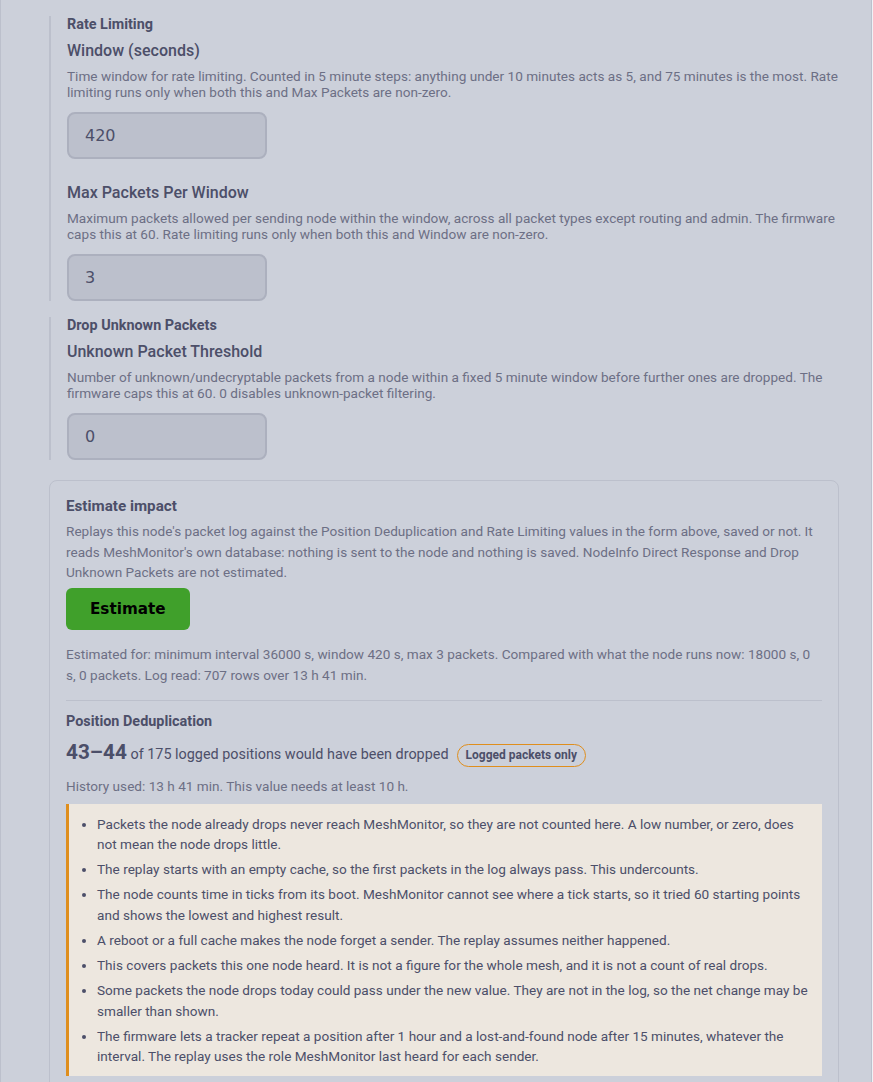
The panel uses the values in the form as they stand, saved or not. It runs only when you press the button. It reads MeshMonitor's own database: nothing is sent to the node and nothing is saved. It costs no airtime.
It needs packetmonitor:read and configuration:read on that source. It names a sender only if you could already see that node; others are counted under "Other senders".
What it shows
- A range, not one number. The node counts time in ticks from the moment it booted, and MeshMonitor cannot see where a tick starts. The panel tries 60 possible starting points (every 30 seconds across the 30 minutes in which both tick clocks repeat) and shows the lowest and highest result. For a value short enough to be reset by the node's once-a-minute cleanup, it also tries four cleanup timings for each, 240 in all.
- Only the extra drops. It runs the rules twice, once with the node's current settings and once with yours, and counts a packet only when your values drop it and the current ones do not.
- By sender and by packet type, most affected first.
- The history it used, next to the history the value needs.
- How the firmware reads your value, when ticks or caps change it (for example a 7 minute window acting as 5).
- The firmware version the rules were copied from. Another firmware version may behave differently.
What the numbers do not mean
The panel prints these limits beside the numbers. They are part of the answer.
- The figure is logged packets that would have been dropped at this one node. It is not a count of real drops and not a figure for the whole mesh.
- For Rate Limiting it is a lower bound. The node also counts relayed direct messages that MeshMonitor never sees, so the real figure is likely higher.
- For Position Deduplication it covers logged packets only. A longer interval can also let through a repeat that the current interval drops (the window moves), and that packet is not in the log. The net change can be smaller than shown.
- Zero does not mean "nothing". Traffic the node already drops is absent from the log.
- The replay starts with an empty cache, so the first packets in the log always pass. This undercounts.
- It assumes the node did not reboot or evict a sender during the history.
- Packets that MeshMonitor decrypted itself (Channel Database keys) were undecodable to the node. The rate limiter did not count them, and neither does the replay. The panel says how many it skipped.
- Tracker and lost-and-found caps use the role MeshMonitor last heard for each sender.
When it refuses
The panel does not print a number it cannot stand behind. It says why, and what would help.
| It says | Why | What to do |
|---|---|---|
| Packet logging is off | No history to replay | Turn on packet logging under Settings → Packet Monitor and let it collect traffic |
| The log covers too little time | Position dedup needs history at least as long as the interval. Rate limiting needs at least 6 full windows | Wait, or raise the limits under Settings → Packet Monitor (up to 10,000 rows and 168 hours) |
| The value is looser than the node's current one | The log holds only packets the node already passed, so it cannot show what a looser value lets in. A change that lowers Max Packets but also shortens the window counts as looser | Only tighter values can be estimated |
| The value acts the same as the current one | After ticks and caps the firmware would treat both alike | Nothing to estimate |
It is also unavailable for a source with no connected Meshtastic node (MQTT, MeshCore, a TCP source that is down), and it does not appear under Admin Commands: MeshMonitor has no packet log for a remote node.
The replay reads at most the newest 50,000 log rows for the source, well above the log's 10,000 row ceiling, and says so if it ever stops there.
Estimating impact by hand in Packet Monitor
Use this for the two rules the panel does not cover, and to check the two it does. Turn on packet logging first, pick the right source, and remember every limit above still applies.
Position Deduplication. Filter by Type: POSITION and by one From node. Read down the timestamps. Repeats with the same coordinates, on a default-key channel, closer together than your interval are the ones that would go. On a 2.8 node the default 5 hour window is already at work, so a parked node should show at most one position per 5 hours. If it shows more, the node rebooted, the sender is a tracker, or the channel is private.
Rate Limiting. Filter by one From node, leave Type on all, and count rows in any 5 minute stretch (ignore ROUTING and ADMIN rows, and rows marked Decrypted by server). More rows than your Max Packets means that sender would be throttled. The Live Mesh Activity widget and the per-node packet counts on the Info tab show the busiest senders quickly.
Drop Unknown Packets. Filter by Encrypted: yes and one From node. These are the packets the node could not decode. Count them per 5 minutes and compare with your threshold. Rows marked Decrypted by server also count as unknown to the node. MeshMonitor sees only the encrypted broadcasts; the node also counts encrypted direct messages between other nodes, so the real count is higher.
NodeInfo Direct Response. History cannot show this well. The requests it acts on are direct messages between two other nodes, which the node never hands to MeshMonitor. Filter by Type: NODEINFO to get a feel for how much NodeInfo traffic there is, and no more than that.
Telemetry display
The protobufs define a TrafficManagementStats telemetry message with seven counters, and MeshMonitor can store and chart it under a "Traffic Mgmt:" group:
- Packets inspected
- Position-dedup drops
- NodeInfo cache hits
- Rate-limit drops
- Unknown-packet drops
- Hop-exhausted packets
- Router hops preserved
Current firmware does not send these
No firmware through v2.8.1.8e6a88d and develop (October 2026) transmits TrafficManagementStats. The module keeps the counters in RAM, and nothing in the firmware puts them in a telemetry packet. The "Traffic Mgmt:" graphs stay empty until a firmware release sends them. The last two counters belong to features the firmware has shelved, so they would read 0 even then.
There is no way today to ask a node how many packets it dropped. The only trace is the node's own serial log, which prints a [TM] drop … line for each drop.
Firmware requirements
Traffic Management requires Meshtastic firmware 2.8.0 or newer. MeshMonitor gates support on the firmware version and disables the Traffic Management section as "Unsupported by this device" on all 2.7.x firmware.
The 2.7.x silent-drop gotcha
The released v2.7.26 source contains neither TrafficManagementModule nor the traffic_management AdminModule set-config handler. A 2.7.x node can decode the config message but silently drop it, making a save appear successful without persisting. MeshMonitor therefore gates support at 2.8.0, matching Meshtastic's documented requirement.
Recommended starting configuration
Start conservative and tighten only once you understand how your mesh behaves:
- Leave Position Deduplication at its default (18,000 seconds) unless you have a reason to change it. It trims the most common source of repeated airtime with little risk.
- Leave Rate Limiting and Drop Unknown Packets at 0 until you have watched your mesh's normal traffic. Both drop packets, and you will not see what they dropped.
- Be extra careful on a router node. These settings affect traffic the node relays for everyone, so an aggressive value on a router affects its neighbors' reachability, not just the local node.
- Change one value at a time, and press Estimate before you save a tighter one.
After a change, watch the Packet Monitor for the traffic you expect to remain. There are no drop counters to check (see Telemetry display).
Related
- Telemetry Widgets
- Packet Monitor
- Coverage Report — how position dedup hides repeats from a survey
- Upstream firmware module source: https://github.com/meshtastic/firmware/blob/develop/src/modules/TrafficManagementModule.cpp