

Message Delivery Details
New in 4.14
Every message you send shows a small delivery status icon (a checkmark, a red X, a clock, or a spinner). Click that icon on any message you sent to open Delivery Details, a diagnostic popup that explains exactly what MeshMonitor knows about what happened to that packet, in your protocol's own terms.
The guiding principle is honesty: every field in the popup is labeled with where it came from, and the popup never presents a guess as a fact.
Opening Delivery Details
Click the delivery status icon next to any message you sent, in Channels, Direct Messages, or MeshCore. The popup title reads "Delivery Details -- Meshtastic" or "Delivery Details -- MeshCore" depending on the source's protocol. Received messages (from other people) don't have a status icon and aren't clickable this way.
The honesty model: provenance badges
Every field in the popup carries a small badge showing where the value came from:
| Badge | Meaning |
|---|---|
| Reported by Protocol | The radio or companion firmware told MeshMonitor this value directly (e.g., a routing error code, a hop limit, an ACK'ing node). |
| Observed by MeshMonitor | MeshMonitor derived this by watching the mesh itself, not from a field the protocol handed it directly (e.g., a timestamp it recorded, a relayer it correlated from repeated packets). |
| Inferred | MeshMonitor calculated or estimated this from other data (e.g., hops used, computed as starting hop limit minus remaining hop limit). It is a best-effort derivation, not a reported value. |
| Unknown | Nothing is recorded for this field. MeshMonitor shows "Unknown" rather than guessing or leaving the field blank. |
If a field says "Unknown," that's not a bug, it means the firmware or protocol never reported it for this packet (older firmware, a packet type that doesn't carry it, or data that wasn't recorded at send time).
Status and "What This Means"
At the top of the popup is the overall delivery status (e.g., Not Confirmed, Acknowledged by Mesh, Confirmed by Destination, Pending, Timed Out), followed by a plain-language explanation under What This Means.
A red X is not proof the message wasn't received
"Not Confirmed" means MeshMonitor received no acknowledgement for this packet, not that delivery is known to have failed. Acknowledgements travel back over the same lossy RF mesh as the original message, so the ACK itself can be lost even when the recipient got the message fine. Treat a red X as "unconfirmed," not "failed."
For direct messages, MeshMonitor distinguishes two levels of confirmation:
- Acknowledged by Mesh -- at least one mesh node (not necessarily the destination) rebroadcast or acknowledged the packet. It entered the mesh, but the destination itself hasn't been confirmed.
- Confirmed by Destination -- the destination node itself sent back an acknowledgement. This is the strongest confirmation MeshMonitor can show.
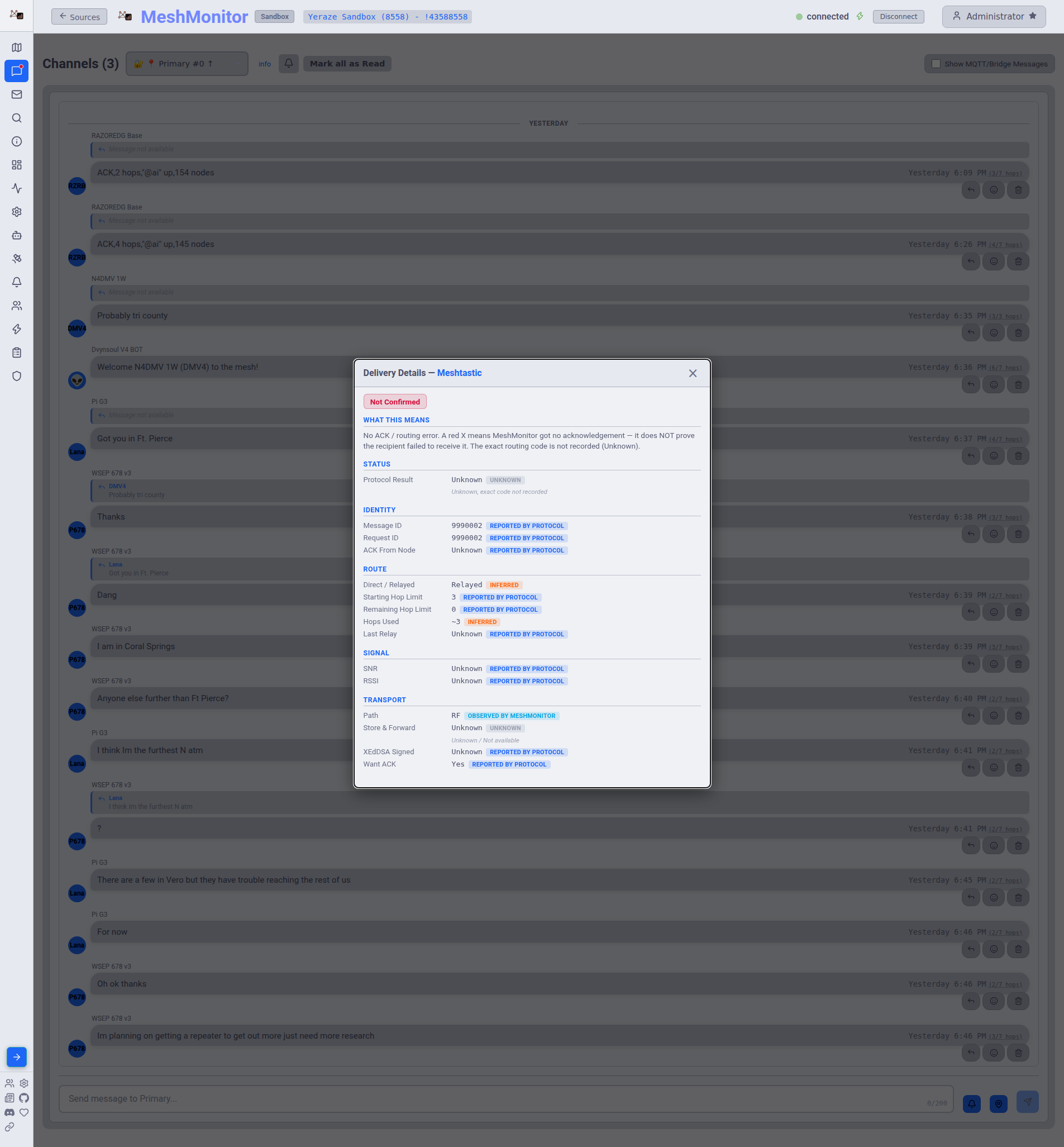
Protocol Result
Shows the exact result the protocol reported for the send attempt:
- Meshtastic -- the
RoutingErrorname and numeric code, e.g.MAX_RETRANSMIT (5), when a send failed. If no error was recorded, this shows "Unknown." - MeshCore -- the acknowledgement type reported by the companion, e.g.
PACKET_ACK (0x82), when the packet was delivered.
Identity, Route, Signal, and Transport
The rest of the popup is organized into labeled groups, each field carrying its own provenance badge. Fields with no recorded data show "Unknown" rather than a blank:
- Identity -- Message ID, Request ID, and the node that sent the ACK (if any).
- Route -- whether the send was direct or relayed, starting hop limit, remaining hop limit, an inferred hops-used count, and the last relay.
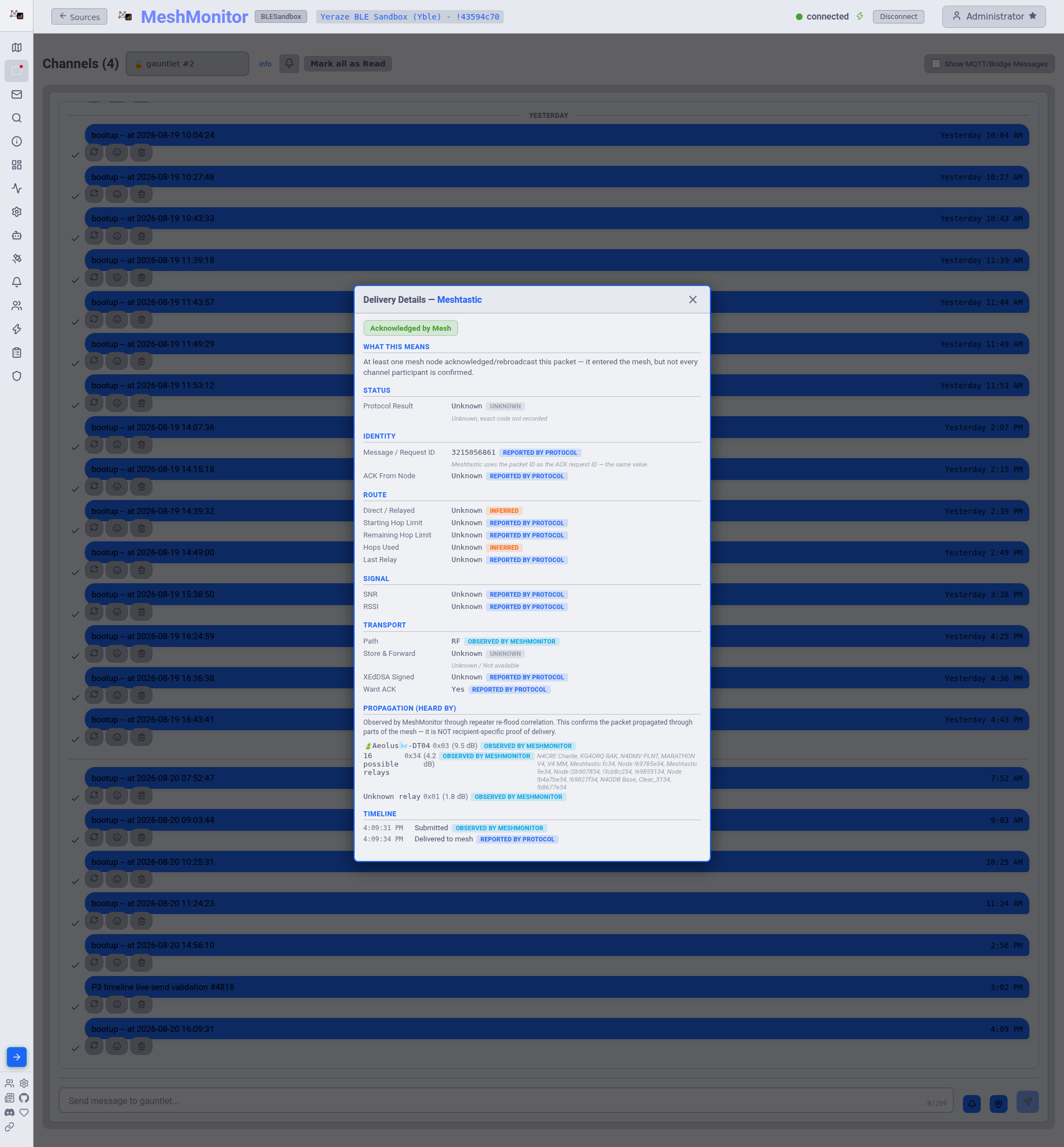
- On Meshtastic, the last relay is only ever a 1-byte partial node ID (the protocol doesn't send a full node number in the routing ACK), so MeshMonitor shows the candidate node name only when exactly one known node matches that byte, "N possible relays" when several nodes share it, or "Unknown relay" when nothing matches, always alongside the raw
0xNNbyte so you can judge for yourself. MeshCore reports full relay hashes, so its relay field doesn't have this ambiguity.
- On Meshtastic, the last relay is only ever a 1-byte partial node ID (the protocol doesn't send a full node number in the routing ACK), so MeshMonitor shows the candidate node name only when exactly one known node matches that byte, "N possible relays" when several nodes share it, or "Unknown relay" when nothing matches, always alongside the raw
- Signal -- SNR and RSSI for the ACK, when reported.
- Transport -- whether the packet traveled over RF or MQTT, whether it passed through Store & Forward, whether it was XEdDSA-signed, and whether "Want ACK" was requested.
Propagation (Heard By)
For messages sent to a channel (not a direct message), the popup includes a Propagation (Heard By) section listing the repeaters MeshMonitor observed re-flooding the packet, each with its observed SNR.
Observed propagation, not proof of delivery
Heard-By is built from MeshMonitor correlating repeated copies of the same packet as it re-floods through the mesh. It confirms the packet propagated through parts of the mesh MeshMonitor could hear. It is not recipient-specific, it says nothing about whether any particular destination node actually received the message.
Because Meshtastic's relayer field is a 1-byte partial ID, each row is labeled honestly:
- A node name, when the byte matches exactly one node MeshMonitor knows about.
- "N possible relays" with the list of candidate node names, when the byte matches more than one node. MeshMonitor never guesses which one it actually was.
- "Unknown relay", when the byte doesn't match any known node.
Every row shows the raw 0xNN byte alongside its interpretation. MeshCore reports full relay hashes instead of a partial byte, so its Heard-By rows identify the relay unambiguously.
Timeline
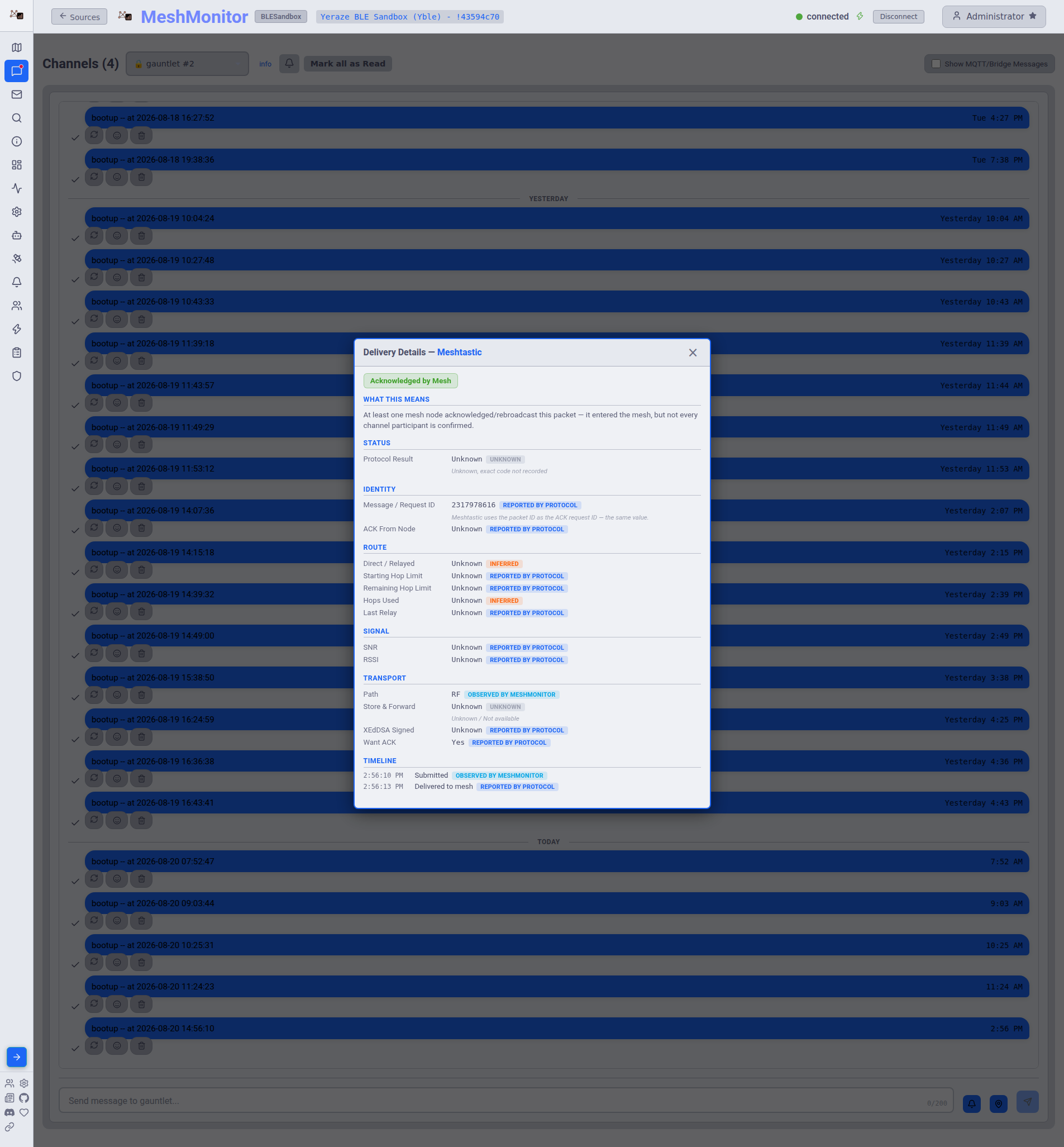
The Timeline section lists every event MeshMonitor recorded for the message, in order, with a timestamp and provenance badge for each: submitted, sent, delivered or confirmed, and (when they occur) routing error, timeout, or retry. The timeline is persisted to the database, so it survives a MeshMonitor restart, not just kept in memory for the current session.
Related Documentation
- Message Search -- searching across channels, DMs, and MeshCore messages
- Link Quality & Smart Hops -- ongoing reliability scoring for a node, built from message and traceroute history
- Packet Monitor -- raw packet-level traffic, including routing ACKs and errors
- MeshCore -- MeshCore messaging and companion protocol details