

Impersonation Detection
MeshMonitor flags packets and messages that appear to impersonate your own locally-connected node — a sign that someone on the mesh is spoofing your node's identity.
Why this matters
Meshtastic channel (broadcast) messages have no cryptographic sender authentication. A packet's from field is just a number, and anyone who holds a channel's pre-shared key can transmit a packet with any from value — including yours. Meshtastic's own documentation notes that impersonation on a channel is trivial.
The most confusing case for a monitor is when an attacker spoofs your own locally-connected node's number. Without a guard, those forged packets look like messages you sent, and MeshMonitor used to render them as your outgoing messages. Impersonation Detection closes that gap.
How detection works
When MeshMonitor's connected node genuinely transmits, the host sees that packet as an internal event with no radio-reception metadata and a fresh hop count. A packet that actually arrived over the air looks different:
| Signal | Genuine local transmission | Received over RF |
|---|---|---|
| Transport | INTERNAL / API | LoRa / MQTT / UDP |
| Rx SNR / RSSI | absent (0) | present |
| Hop count | hop_start == hop_limit (fresh) | hop_start > hop_limit (travelled) |
So a packet that claims from == your local node but carries any of those RF-reception markers cannot be one of your genuine transmissions. If MeshMonitor also confirms it isn't a packet you recently sent, it is flagged spoofSuspected.
Avoiding false alarms
Your own packet can legitimately come back to you over the air — a neighbour rebroadcasts it and you overhear it, the MQTT bridge echoes it, or store-and-forward replays it. Those look structurally identical to a spoof. MeshMonitor distinguishes them by the packet id: a genuine echo reuses an id your node originated, while a spoof carries an id you never sent. MeshMonitor keeps a short-lived record of the packet ids it has recently sent and suppresses matches, so overheard echoes are not flagged.
What you'll see
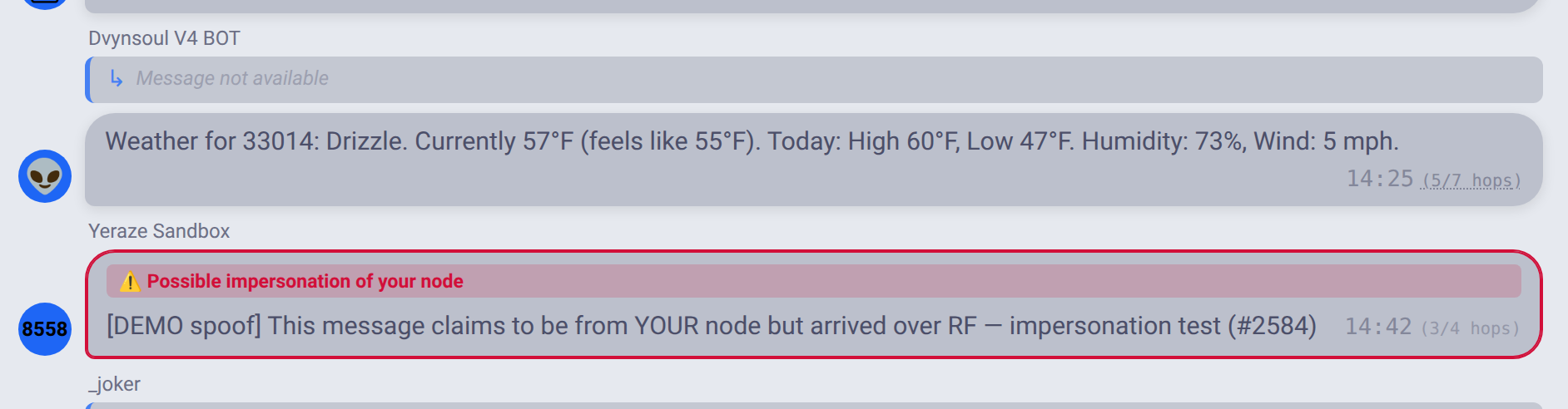
- Channel view — a suspected message is no longer shown as one of your own outgoing messages. It is rendered as incoming with a red ⚠️ Possible impersonation of your node badge.
- Packet Monitor — matching packets are highlighted and marked with a ⚠️ indicator in the direction column.
Scope and limitations
- Per-source. "Your local node" is evaluated per connection, so detection is correct even when you monitor several nodes at once.
- Phase 1 covers self-node spoofing — packets impersonating your connected node. Detection of other nodes being impersonated builds on the existing key-mismatch signal and is a planned follow-up.
- Channel messages are heuristic. Because channel traffic is unauthenticated, detection relies on the transport/reception signals above rather than cryptography. Direct messages sent with PKI are cryptographically verifiable; using that to harden DM detection is a planned follow-up.
- Detection is observe-and-flag only — MeshMonitor does not auto-block or act on a spoof, since the inputs themselves are spoofable.
Hardening tips
- On your node, consider enabling "require PKI" for direct messages so unauthenticated DMs claiming a sensitive sender are rejected at the firmware level.
- Review flagged messages in the channel view and flagged packets in the Packet Monitor to understand who is transmitting on your channels.
Related
See Security for key-mismatch detection and the security dashboard, and the Packet Monitor for raw packet inspection.