

Node Number Changes (Meshtastic 2.8)
Meshtastic 2.8 changed how a node picks its node number. Before 2.8 the number came from the radio's hardware MAC address. From 2.8 it is derived from the node's public key instead.
The practical effect is blunt: every node that upgrades to 2.8 gets a new node number, and MeshMonitor sees it as a brand-new node.
If your whole mesh upgrades over a weekend, most of your node list goes dark and a set of look-alike entries appears beside it. Nothing is broken. This page explains what you are seeing, what MeshMonitor does about it, and how to move a node's history onto its new number if you decide the pairing is right.
What actually happens
On its first 2.8 boot a node computes crc32(public_key) and adopts that as its node number. The keypair itself is untouched — the node keeps the same key it had on 2.7 — so only the number moves.
The change is one-way. Downgrading the firmware does not restore the old number, and the firmware sends nothing that links the old number to the new one. Every other node on the mesh, and every tool watching it, simply sees the old node stop transmitting and a new one start.
A node with no public key keeps its MAC-derived number. Keys are generated only once a region is set, so an un-provisioned node can renumber days or weeks after it first ran 2.8 — for example the first time someone sets its region.
What you will see in MeshMonitor
- The old entry stops updating. Its last-heard time freezes at the moment of the upgrade and it ages out of your "active nodes" view like any silent node.
- A new entry appears with the same long name and short name, a new node ID, and no history.
- Telemetry graphs, position history, packet logs, traceroutes and messages recorded before the upgrade stay attached to the old node number. They are not lost, but they are no longer reachable from the new entry.
- On the map you may briefly see both, until the old one falls outside your node-age window.
The identity-change notice
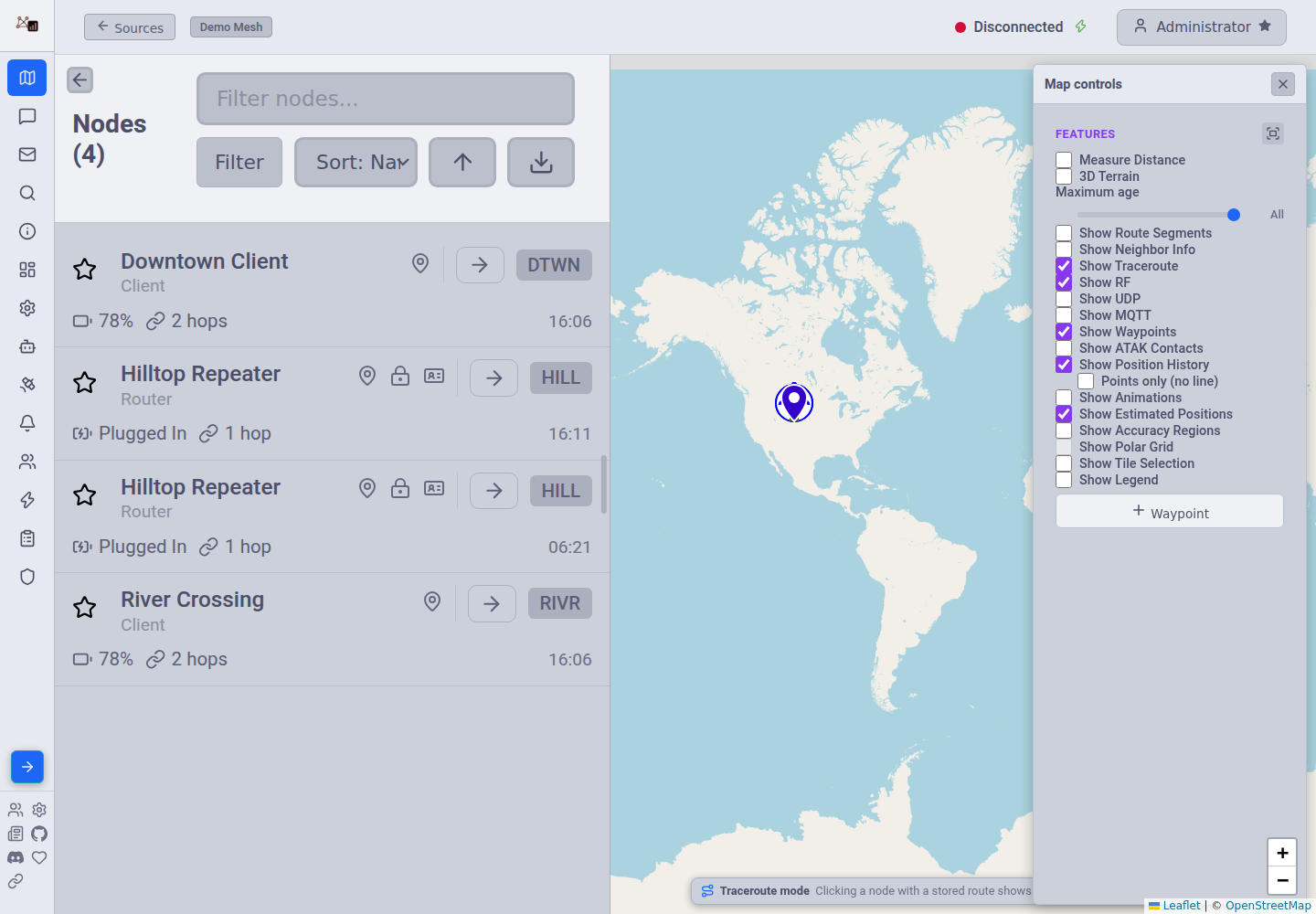
MeshMonitor detects the likely pairing and tells you about it. Look for the identity badge in the node list — it appears on both halves of a pair, with the wording flipped:
- On the new node: "this is likely the node previously known as …"
- On the old, silent node: "this node has likely continued as …"
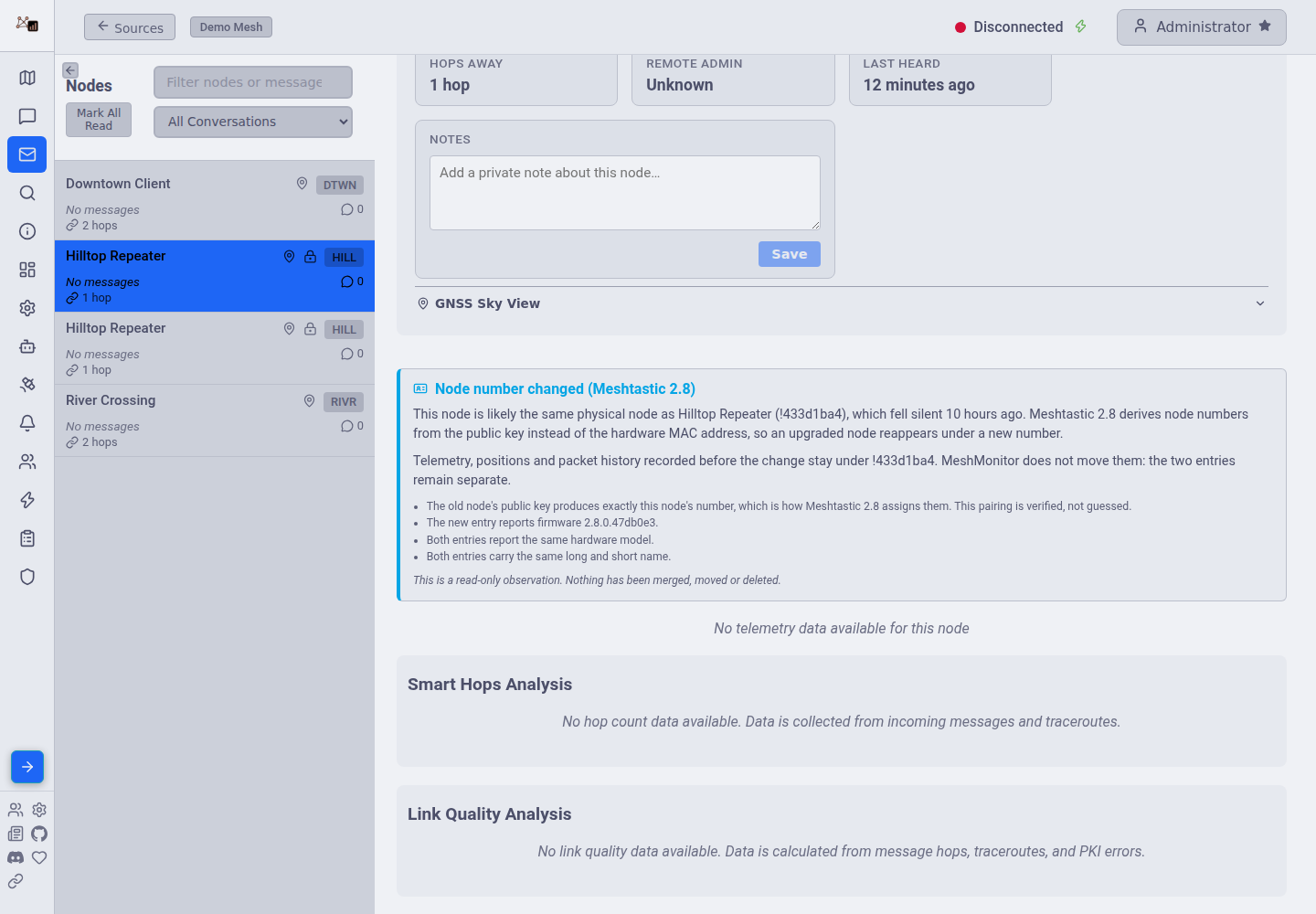
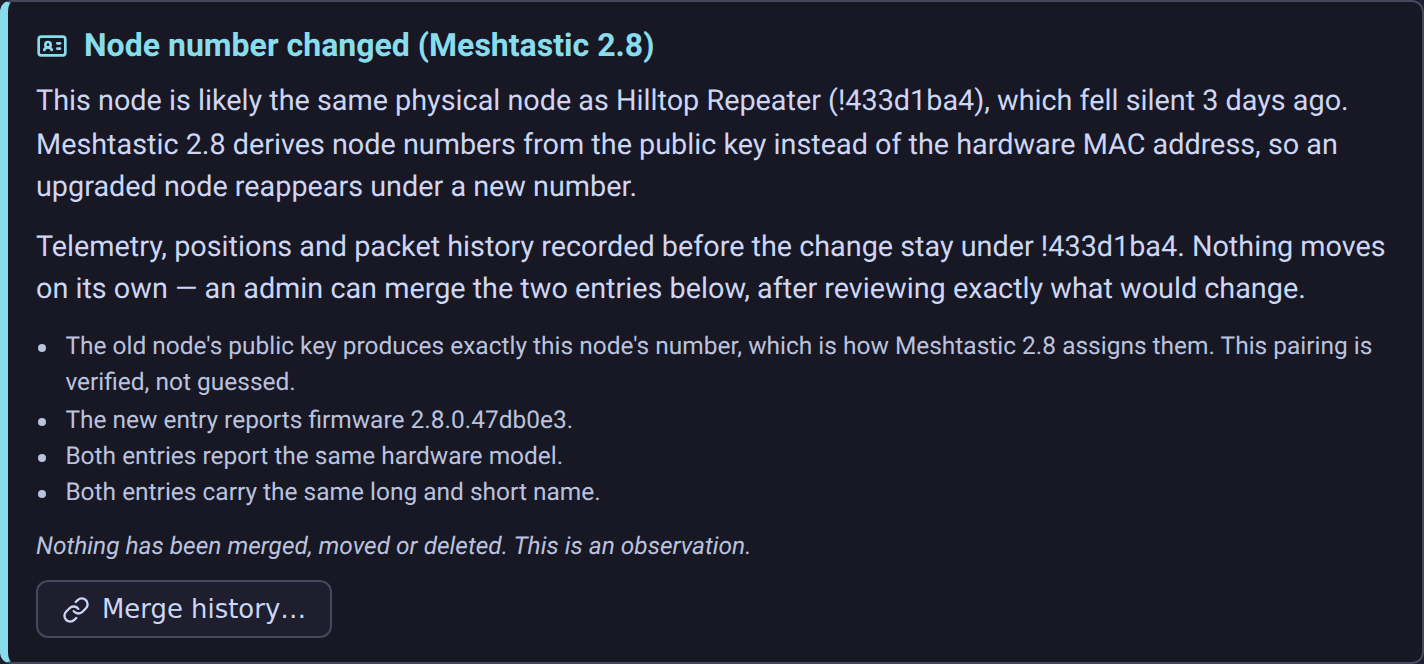
Open Node Details for either one and you get the long form: which node it is paired with, what the pairing is based on, and where the old history lives.
How the pairing is worked out
Only key-verified pairings are reported. Two signals:
| Basis | Confidence | What it means |
|---|---|---|
derivedNodeNum | High | The old entry's public key CRC-32s to exactly the new entry's node number. That is the firmware's own rule, so this is a verification rather than a guess — and it holds even if you renamed the node during the upgrade. |
publicKey | High | Both entries carry the same public key. A node keeps its key across the upgrade, so this is the same node. |
A third signal — matching long and short names, for nodes with no key on file — exists in the code but is switched off. A name match is a guess: two genuinely different nodes that share a long and a short name look identical to it. Since these pairings are what an operator merges history on, MeshMonitor only reports pairings the node's own key vouches for. A keyless node that renumbers is therefore not reported at all, which is the right answer when the alternative is a coincidence presented as a fact.
A pairing is only reported when the timing also looks like a handover: the old entry fell silent around the time the new one first appeared, it is still silent now, and the new entry is the one currently transmitting.
Two guards keep false pairings out:
- Different keys are a hard veto. If both entries carry a public key and the keys differ, they cannot be the same node under 2.8's rule, however well the names line up. Two same-named neighbours are never paired.
- Firmware-default names are ignored. An entry still called
Node !a1b2c3d4has never sent its NodeInfo. Matching on that placeholder would pair every unnamed node with every other one. (This guard only matters for the disabled name signal, but it stays in place.)
The notice retires once the new entry is no longer new (90 days), so an old name collision never becomes a permanent badge.
Detection is per-source
A node on one source is never compared against a node on another. Two sources are two different meshes — a shared name or key across them says nothing about a firmware upgrade, and pairing across them would leak node names past the per-source permission boundary.
If you watch the same physical mesh through both a direct TCP source and an MQTT source, you will see the notice separately on each, which is correct: each source keeps its own node table.
Merging the history
If you are satisfied the pairing is right, an admin can move the old node's history onto the new node number. This is the one action in MeshMonitor that rewrites history in place, so it is built to be inspected before it runs and reversed after it.
Open Node Details for either half of the pair and choose Merge history…. The button appears for administrators only.
Step 1 — the dry run
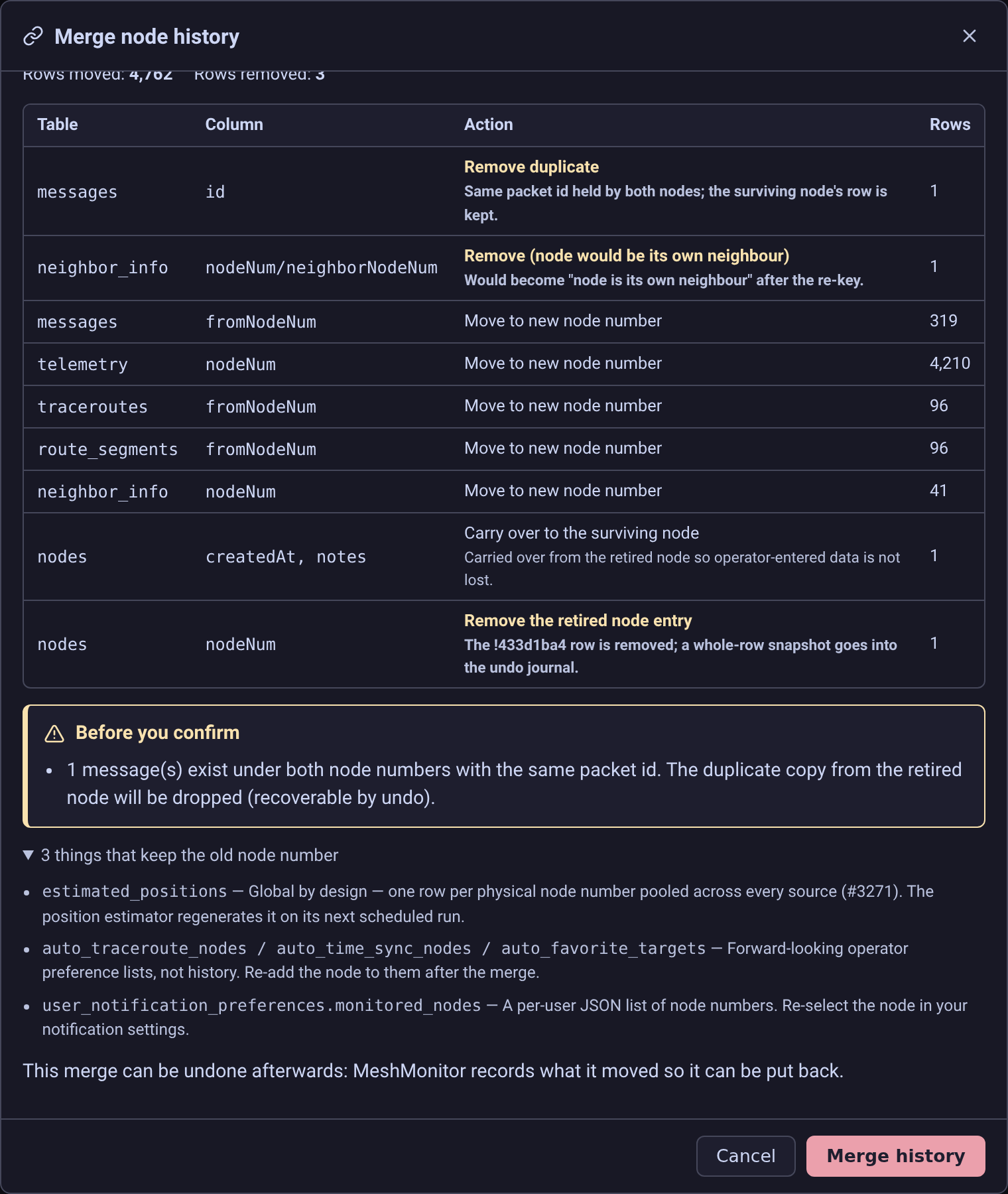
Nothing is written when the dialog opens. It shows a per-table count of exactly what would move, what would be removed, and what would stay behind:
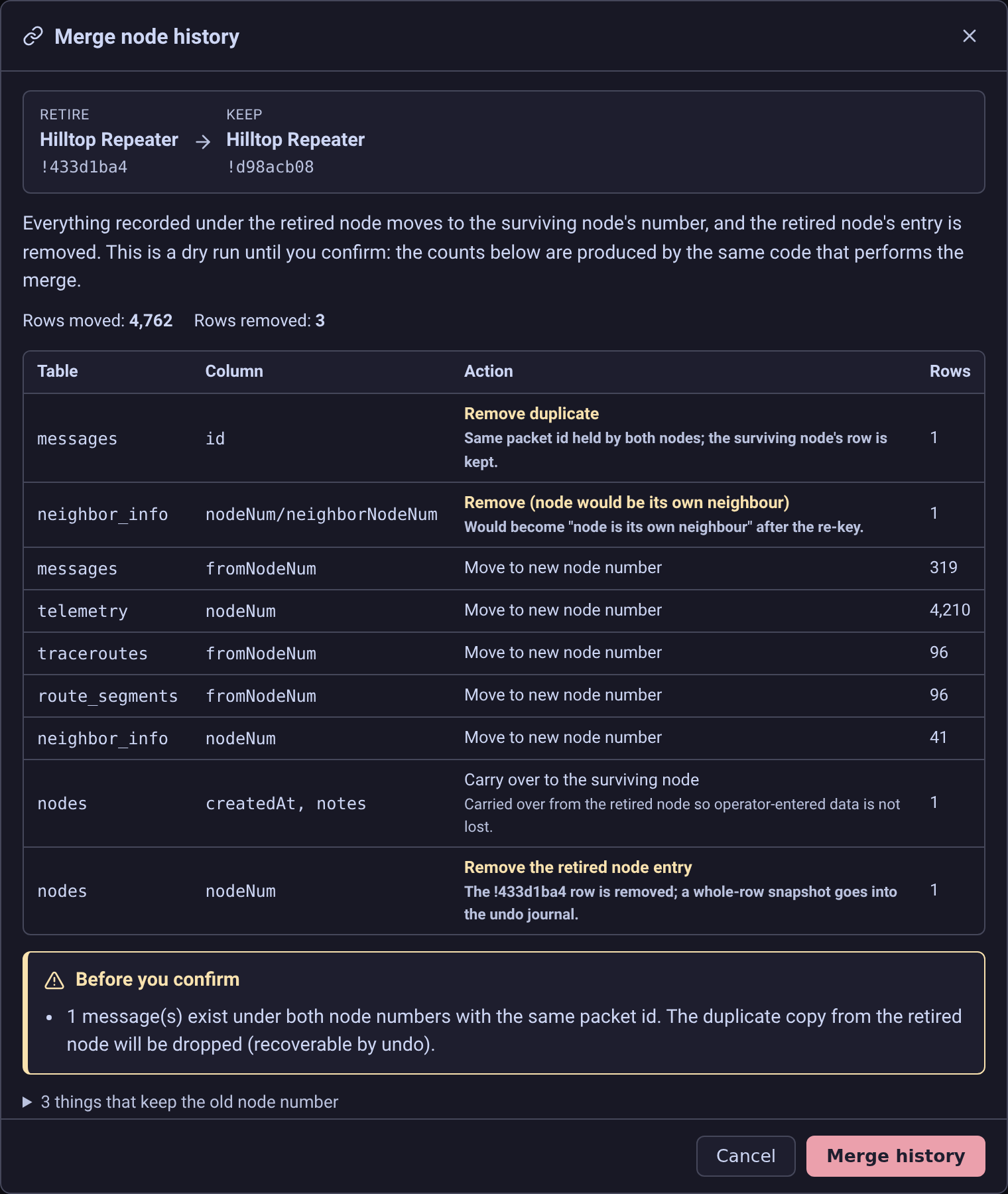
The counts come from the same server code that performs the merge — the merge re-runs that count inside its own transaction and applies exactly what it described. There is no separate estimate that can drift from reality.
Step 2 — the confirmation
The merge runs only when you press Merge history, and only then. It runs as a single database transaction on SQLite, PostgreSQL and MySQL alike: it either completes or leaves the database exactly as it found it. A half-applied merge is not a state MeshMonitor can produce.
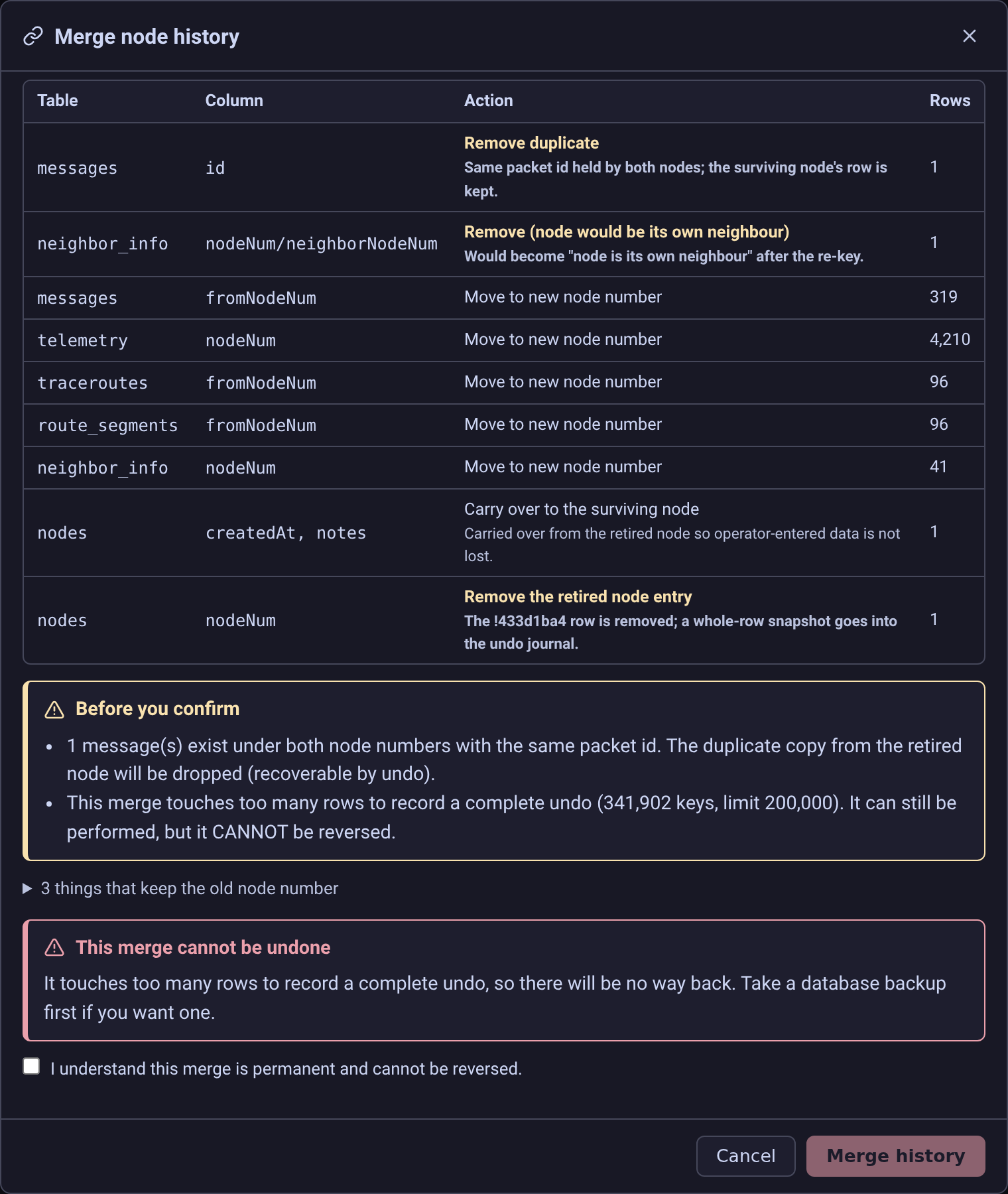
If the merge is too large to record a complete undo for, the dialog says so in red and the confirm button stays disabled until you tick an explicit acknowledgement.
When the merge is too large to journal, the guarantee is replaced by a red block and the confirm button stays disabled until the acknowledgement is ticked:
What moves
Everything the retired node's number appears in, within that one source:
| Table | Columns re-keyed |
|---|---|
messages | sender, recipient, relay, ack — and the row's primary key, which encodes the sender |
telemetry | node number and node id |
traceroutes, route_segments | both endpoints |
neighbor_info | the node and its neighbours |
packet_log, mqtt_packet_log, mqtt_ok_to_mqtt_violations | sender, recipient, relay, gateway |
waypoints | owner |
atak_contacts | node number |
dead_drop_messages | sender |
auto_traceroute_log, auto_key_repair_log | node number |
ignored_nodes, mesh_beacon_offers | moved across, or dropped if the surviving node already has a row |
nodes | the retired entry is removed; the survivor keeps the earlier first-seen date, plus the retired entry's notes and favourite flag if it had none |
What does not move
The dialog lists these too, so nothing is a surprise afterwards:
estimated_positionsand its anchors — one row per physical node number, pooled across every source by design. A per-source merge must not rewrite a row another source shares; the position estimator regenerates it on its next run.- Global, source-less state — key-repair state, geofence cooldowns, mesh issues, automation home anchors. These self-heal or expire.
- Your preference lists — auto-traceroute, auto-time-sync, auto-favourite targets and their assignments, and the monitored-node list in your notification settings. Re-add the node to those after the merge. They are forward-looking configuration rather than history, and the favourite tables are unique per node, so re-keying them would collide with any entry the surviving node already has.
backup_history— a record of what a past backup contained, which stays true.
Collisions
Both entries can occasionally hold the same row. The rules are fixed and shown in the preview:
- The same message under both numbers. A message's id is
source_node_packet, so re-keying the sender changes the primary key, and two copies of the same packet collide. The surviving node's copy is kept and the retired node's copy is removed — the two are the same packet observed twice, so neither is more correct, and "keep the one already under that id" needs no tie-break that could differ between the preview and the merge. - "Old node heard new node" neighbour rows. A real observation before the upgrade, a self-loop after it. Removed.
ignored_nodes/mesh_beacon_offers. At most one row per node, so if the survivor already has one the retired node's is removed.
Every removed row is snapshotted whole before it goes, so an undo puts it back exactly as it was.
Undo
Each merge is recorded with enough detail to run it backwards, and the record is written inside the merge's own transaction. Undo restores the re-keyed rows, the removed rows and the retired node's entry.
Four things stop an undo, and they refuse rather than guess:
- The merge was already undone.
- A newer merge involving either node is still in place. Undo them in reverse order.
- The retired node number exists again — it started transmitting after the merge. Restoring the snapshot would collide with a live row.
- The merge was recorded as not undoable, because it was too large to journal. The dialog told you this before you confirmed.
Rows that arrived after the merge stay under the new number. Undo puts back what the merge moved, not the traffic that has come in since.
Permissions and scope
- Merging requires
nodes:writeon that source and an administrator account. Ordinary write access is not enough. - A merge never crosses sources. Both node numbers must exist on the same source, and every statement is scoped to it — a merge on one source cannot touch a single row belonging to another, even when both hold the same node numbers.
- Detection never triggers a merge. The two node numbers come from you; the detector only supplies the "verified" label recorded on the audit row. If you merge a pair the detector does not back, the dialog says the pairing is unverified and the audit row records it as
manual.
If you would rather not merge
Nothing forces you to. Let the old entry age out: new telemetry accumulates under the new number and the graphs fill in again over the following days.
To tidy the list without merging:
- Re-favourite the node under its new number, if you had favourited it.
- Update any automations, notification rules or monitored-node lists that reference the node explicitly. These are keyed on node number and will keep pointing at the silent old entry until you change them.
- Delete the old entry once you no longer need its history (node list → delete). Unlike a merge, this is not reversible — the old telemetry and position history go with it.
Related: duplicate-key security warnings
MeshMonitor separately warns when two nodes share a public key, because that is also what an impersonation attempt looks like. A 2.8 renumber briefly produces exactly that shape: one key, two node numbers.
The two are told apart by liveness. In an upgrade the old identity never transmits again; in an attack both parties are transmitting at once. MeshMonitor suppresses the security warning only for the clear handover case — see Duplicate Encryption Keys.
If you see a duplicate-key warning that has not been suppressed, and both node numbers are actively transmitting, treat it as a security issue rather than a firmware upgrade.
One more 2.8 change worth knowing
From 2.8, a node's NodeInfo reports an all-zero MAC address for every node except the local one — the field was dropped from the firmware's internal node record and is zero-filled for backward compatibility. A blank or 00:00:00:00:00:00 MAC on a 2.8 node is expected, not a fault.
Source
Meshtastic 2.8.0 release notes: "Node numbers (ID) are now derived from the public-key identity of the node instead of hardware mac address."