

Global Settings
New in 4.0
4.0 split "settings" into global (one per deployment) and per-source (one per connection). The Global Settings page, reachable from the dashboard sidebar, holds everything that doesn't belong to a specific source.
Opening Global Settings
Click the gear icon titled Global Settings in the dashboard sidebar footer (it collapses into a hamburger on mobile). The icon shows to anyone with settings: read on at least one source. Saving needs settings: write, and some sections show to administrators only: Remote Administration, Apprise API Server, Elevation / Terrain, Flight matching (ADS-B), Message Translation, Channel Database, Scripts and Analytics.
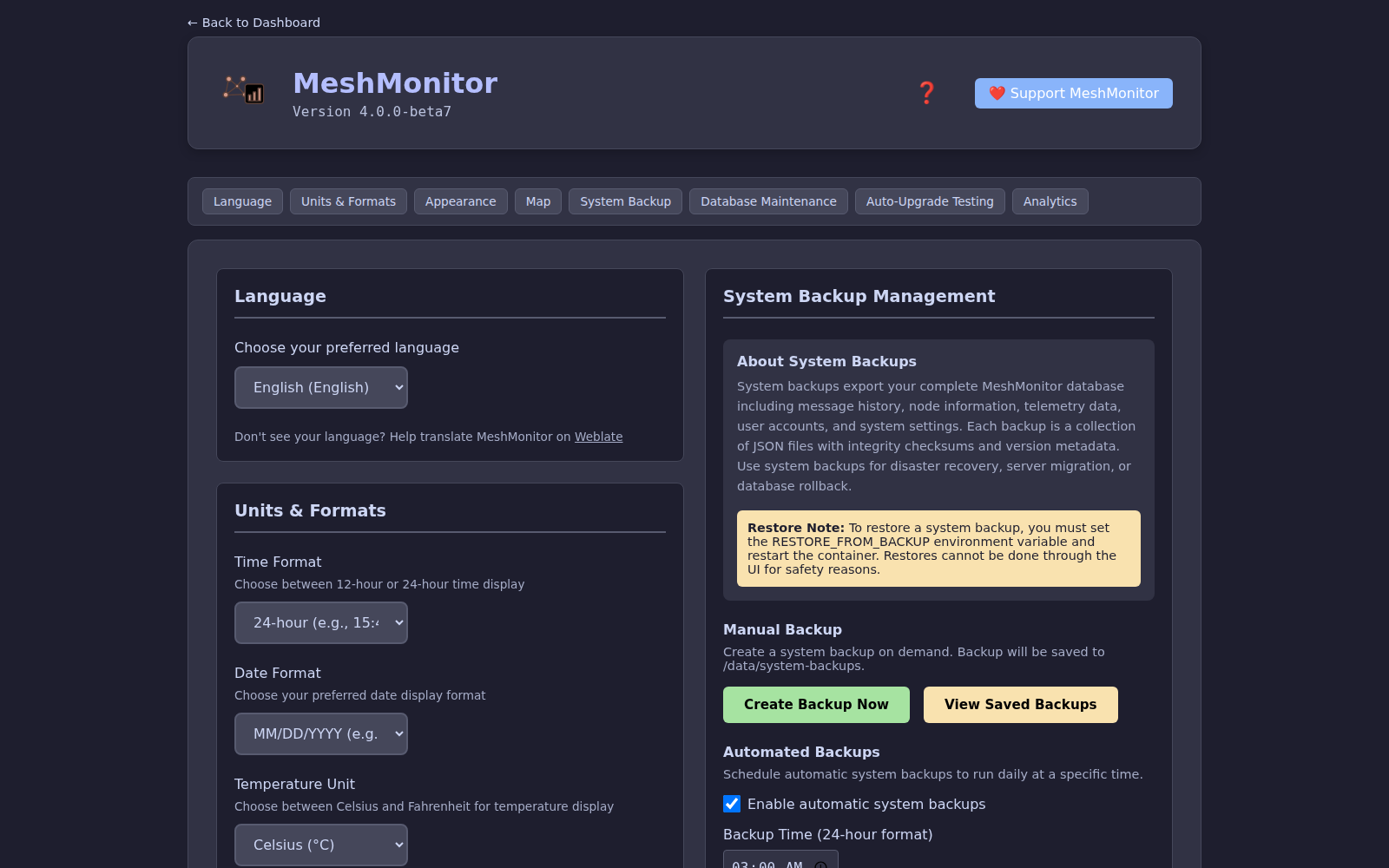
What lives here
MeshMonitor has three settings pages. Device Configuration (satellite icon, per source) holds what MeshMonitor writes to, or does on, the radio. Settings (gear icon, per source) holds what MeshMonitor stores and does for that one source. Global Settings holds what applies to the whole install. MeshCore and Reticulum source pages link here from the foot of their left nav rail and from the top of their Settings page.
Language, Units & Formats, Sorting
- System language (Weblate-sourced translations)
- Temperature and distance units, time and date format
- Preferred node list sorting
Appearance
- Theme (15 built-ins + custom themes), icon style, map pin style and node list style
- Default Landing Page (admin-only) — what users see at the root URL: Unified View (default) or any configured source. See Settings → Default Landing Page.
Since 4.17 the theme, units, time and date format, sort order and landing page are install-wide only. A per-source page can no longer hold its own copy, so every page shows the same theme. The upgrade removes old per-source copies.
Map
- Light and dark map tilesets, custom tile servers, the map click zoom gate, marker clustering and Discard Invalid Positions. See Settings → Map Settings.
Notifications
The Apprise API Server section (admin only) holds the server-wide Apprise endpoint. Notification preferences are per user and per source: each user sets them on a source's Notifications tab. The Security Digest lives on a source's Security tab. See Notifications.
Security
Session lifetime, anonymous access, rate limits and similar server policy are set with environment variables, not on this page. See Production Deployment.
- PKI direct message decryption: the install-wide enable switch (the per-source switch is on each source's Settings page). See PKI Direct Message Decryption.
- Reliable PKI: the default for every source, Off, As needed or Avoid PKI (each Meshtastic source can override it on its Settings page). See Reliable PKI.
Channel Database
Server-side decryption keys (admin only). See Channel Database.
Reticulum Settings
The destination retention cap. It applies to every Reticulum source. A Reticulum source's own Settings page holds only a pointer to it.
Privacy
New in 4.13
- Discourage search engine & LLM indexing — opt-in, off by default. When enabled, MeshMonitor adds an
X-Robots-Tag: noindex, nofollowheader to every response and serves a disallow-all/robots.txt, asking crawlers not to index the dashboard. Both are advisory (a crawler must choose to honor them); the/robots.txtbody is offered alongside the header because some reverse proxies (e.g. Cloudflare tunnels) strip custom response headers at the edge.
System Backup / Restore
- Create / download / restore system backups (includes the new
sourcestable) - Schedule automatic backups
- See System Backup for the full workflow
Database Maintenance
Shown on SQLite installs only. An optional scheduled job deletes messages, traceroutes, route segments and neighbor info older than the retention you set for each (7 to 365 days).
Position Estimation
New in 4.9.3
Position Estimation moved here from the per-source Automation tab — it's a single global, cross-source batch job, so it belongs in Global Settings.
Estimate locations for GPS-less nodes by pooling traceroute and NeighborInfo geometry across all Meshtastic sources. Controls: enable, calculation frequency, lookback window, a Maximum acceptable accuracy cutoff (discards low-confidence estimates), and Recalculate now. Gated by settings:write. See Position Estimation.
Coverage Report
A single RF reception retention field, 1–90 days (default 7), controlling how long the Coverage Report keeps recorded receptions before an hourly sweep deletes them. It's a global, deployment-wide setting, not a per-source one. Lowering the value permanently deletes older receptions on the next sweep — the field warns about this before you save. Gated by settings:write.
Per-source settings (for comparison)
Anything that depends on which node you're connected to lives on the source, not here.
On the dashboard, Edit Source holds:
- Connection details (host, port, credentials)
- Virtual Node
On the source's own Settings page:
- Node display, telemetry, packet monitor and solar settings
- PKI direct message decryption switch (Meshtastic)
- Reliable PKI override (Meshtastic)
- MQTT Bridge Configuration (bridge sources)
- Receive-only mode, saved regions, node display, and message filters (MeshCore)
Elsewhere on the source: Auto-Responder, Auto-Announce, Auto-Traceroute, Auto-Ack and the other automations are on its Automation tab, and what is written to the radio is under Device Configuration. Per-source permissions are set on the Users page.
See Multi-Source for the full per-source list.