
Paths, discovery and regions
How MeshMonitor shows and learns routes on a MeshCore mesh, finds nodes, sends adverts, and tags traffic with a region. Most actions here send packets, so the sections say what they cost on air.
Path Visualization
The MeshCore map can render route lines between your local node and each contact, colored by hop count:
- Green — direct (0 hops), drawn solid
- Blue — 1 or 2 hops, drawn dashed
- Orange — 3 or more hops, drawn dashed
- Grey — hop count unknown
Toggle path visibility with Show Paths in the map's Map controls panel. Paths are populated by the Discover Path button in the contact-detail panel (sends firmware CMD 52) or automatically by the Auto-Pathfinding scheduler. When the firmware responds with path discovery results (push code 0x8D), the route is stored and rendered immediately.
Map markers
- Repeater glyph. A MeshCore repeater draws as a relay glyph: one hub linked to three peers. Meshtastic routers keep the tower glyph, so you can tell the two apart on the Unified map, in legends and on the 3D map.
- Hide nodes without a current position advert. A node that stops sharing its position keeps its last stored spot on the map. This toggle, in Map controls, hides a node whose latest advert carried no position. It is off by default. See MeshCore Nodes Without a Current Position Advert.
Trace SNR History
A MeshCore trace records, for every hop on its path, how well each node heard the one before it. MeshMonitor stores these per-hop readings from every trace your source's radio hears. It sends nothing to collect them.
Both MeshCore source types fill it:
- Companion — every completed trace the radio reports: the replies to traces you send from a contact's page, and traces other nodes run that finish within range of your radio.
- Repeater — every trace packet in the repeater's serial packet log, at whatever point of its trip the repeater heard it. This needs a firmware build that logs packets (
MESH_PACKET_LOGGING), the same one the Packet Monitor needs on a repeater. A repeater source cannot send a trace, so all of its readings are overheard.
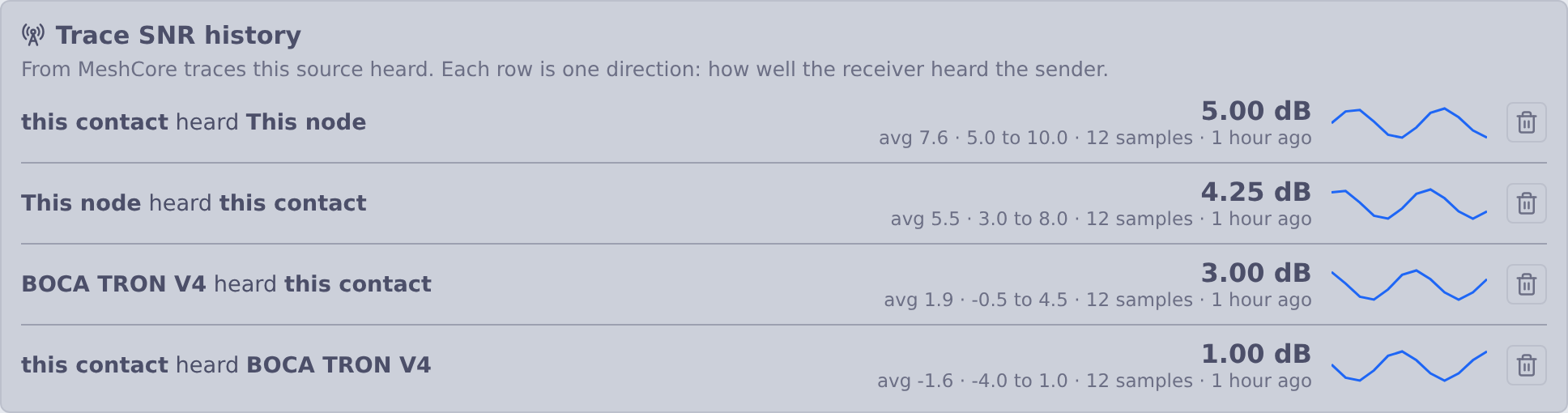
Open a contact in Node Details to see Trace SNR history: one row per link direction, with the latest SNR, the average and range, the number of samples and a small trend line.
Below it, Trace SNR over time draws the same readings as full-size charts, one per link direction, with a time axis and a tooltip that gives the SNR in dB and the time of each sample. The two directions of a link sit side by side in two colours. Pick 24h, 7d, 30d or 90d to set the window. The line breaks where two samples are more than three hours apart. Each chart draws the newest 1,000 samples in the window.
- Direction matters. "A heard B" and "B heard A" are separate rows; the two readings are different measurements.
- Hops are identified by a 1- or 2-byte hash of a node's public key. A hash that matches exactly one of your contacts is shown by name. One that matches none shows as unknown, and one that several contacts share is marked as shared; MeshMonitor does not guess.
- The first sender of an overheard trace is unknown. The trace does not carry who started it. For a trace you sent, it is your own node.
- Per source. Each source keeps what its own radio heard. Reading the history needs Traceroute: read on that source.
- Kept for 90 days. Included in system backups. Deleted with the source.
- Clear one link. With Traceroute: write on the source, each row of the Trace SNR history card has a trash button to the right of its graph. After you confirm, it deletes every stored reading that row draws: one direction of one link ("Hilltop heard this contact"), on that source, at any age. The reverse direction is its own row and stays, as do the other links and other sources. It sends nothing over the radio.
What a repeater source stores from a trace it hears part-way:
- Only the hops that have reported. A trace packet gains one SNR at each hop. A copy heard after two of five hops holds two readings, and MeshMonitor stores those two. If the repeater hears later copies of the same trace, it adds the new hops and stores no link twice.
- The link into the repeater itself. Whichever hop sent the copy, the repeater heard that hop, so that reading is stored as "this node heard that hop". The repeater's log gives this SNR in whole dB; the readings inside the packet are in quarter dB.
- Not the first leg. A copy heard straight from the node that started the trace names no sender, so the repeater's own reading of it is dropped.
MQTT ingest sources do not collect trace readings.
To keep the history fresh without clicking Trace Path by hand, an automation can trace chosen contacts on a schedule, each on its own interval, through a Companion source. One source sends at most 12 scheduled traces an hour. See Trace MeshCore paths on a schedule for the setup and the limits.
Neighbor Discovery
Repeaters maintain a neighbor table of other repeaters heard via zero-hop adverts. MeshMonitor can query this table and display the results:
- Contact-detail panel — a "Get Neighbours" button appears for repeater contacts. Results show each neighbor's name (resolved from pubkey prefix), SNR, and last-heard time.
- Map rendering — neighbor links appear on the map as dashed lines between repeaters.
- Map Analysis — the inspector panel in Map Analysis mode includes a MeshCore neighbor links layer with transport-type filtering (RF / UDP / unknown).
- Database persistence — neighbor data is stored in
meshcore_neighbor_infoand survives page refreshes.
Neighbor queries require authentication to the repeater (guest or admin login). See the MeshCore protocol details for auth requirements.
Fetching the whole table
A repeater sends at most 10 neighbours per reply, and its table can hold 50. The Contact Details neighbour button and Poll Neighbours fetch up to 5 pages, so you see the whole table.
- MeshMonitor logs in once before page 1. Later pages skip the login.
- Each page waits 60 s after the last radio send, so the fetch cannot flood the mesh. A full 5-page fetch takes about 4 minutes.
- A progress line shows the page, the neighbours collected so far, and the wait for the next page.
- Cancel stops the fetch. Neighbours you already have stay stored, and the pages that arrived update them.
- If a page gets no reply, MeshMonitor shows the neighbours it has and keeps the stored list.
The scheduled autopoll fetches 1 page, strongest signal first. It merges the result into the stored list, so the list never shrinks.
Active Node Discovery
Beyond passively reading a repeater's neighbor table, MeshMonitor can actively probe the airwaves for nearby MeshCore devices (added in 4.8.3). The MeshCore Device Configuration page, under Device actions → Discover nodes, exposes three buttons:
- Discover Nearby Nodes — sweep for any MeshCore node in zero-hop (direct RF) range, matching the mobile app's discovery behaviour. Responders are added/refreshed as contacts.
- Discover Repeaters — the same sweep scoped to repeater-class devices.
- Discover Sensors — the same sweep scoped to sensor-class devices.
Discovery is direct-range only (zero-hop) — it surfaces devices you can hear without relaying.
Being discoverable in the other direction is opt-in. Companion firmware does not answer discovery requests on its own, so other nodes find your source in the same sweep only when you tick Respond to discovery requests under Answer discovery requests in the source's MeshCore Settings. It is off by default, needs configuration:write, and its replies are zero-hop and rate-limited.
Auto-Pathfinding
The Automations view (in the MeshCore page sidebar) provides scheduled path discovery and neighbor collection:
- Path Discovery — periodically sends Discover Path requests to all companion contacts to keep route information fresh.
- Neighbors for Repeaters — periodically queries the neighbor list from all repeater contacts and persists results to the database for map rendering.
- Configurable schedule — set the delay between individual requests (3 to 60 minutes, default 5) and how often the full cycle repeats (1 to 168 hours, default 24).
- Independent toggles — enable/disable path discovery and neighbor collection independently.
- RF-aware throttling — requests are spaced by the configured interval to avoid flooding the mesh. A global 60-second minimum spacing between any two scheduled mesh operations on the same source is also enforced.
Retrieved neighbor data is automatically resolved (pubkey prefixes mapped to full contact records) and persisted to meshcore_neighbor_info for map rendering and the Map Analysis inspector panel.
Target filtering
By default Auto-Pathfinding processes every Companion and Repeater contact each cycle. On a large contact list that spends mesh airtime and cycle time on nodes you may not care about. Enable Filter target contacts to narrow which contacts are targeted — it is fully opt-in, so leaving it off keeps the original "everything" behavior. A single filter list covers both sub-features (path discovery still targets companions, neighbor queries still target repeaters).
The filter combines several optional controls, each independently toggleable:
- Limit to selected contacts — a searchable checklist (with Select All / Deselect All and a running count) of the specific contacts to include.
- Filter by name (regex) — include contacts whose name matches a regular expression.
- Limit by last heard — only contacts heard within the last N hours.
- Limit by hop range — only contacts whose cached route hop-count falls within a min–max range. Contacts with an unknown route (i.e. the next send would flood) are excluded while this is on.
- Limit by signal quality — only contacts at or above a minimum RSSI (dBm) and/or SNR (dB). Leave a threshold at its floor value to ignore it.
The controls combine intuitively: last heard, hop range and signal quality first narrow the pool of contacts, then the selected-contacts list and name regex include any contact matching either of them. If you turn the filter on without configuring a selected-contacts list or a name regex, every contact surviving the narrowing filters is targeted. A live matching targets preview shows how many contacts the current settings would target, updating as you edit. All settings are per-source and saved from the shared MeshCore Automations save bar.
Autopoll Neighbours
Beyond the periodic Auto-Pathfinding neighbours cycle (see above), MeshMonitor also runs a per-node retrieval scheduler that keeps a specific repeater's neighbour list fresh on its own schedule instead of waiting for the next global cycle. This is helpful when you care about one link's health more than the full mesh and want its neighbours refreshed every few minutes.
The scheduler shares the global 60-second minimum spacing between mesh operations on the same source, so a per-node autopoll never overlaps a hand-triggered send or an Auto-Pathfinding cycle. Enable it per contact from the contact detail panel.
Adverts
An advert announces this node so others can add it as a contact. MeshMonitor sends two kinds:
- Zero-hop reaches only nodes in direct radio range. No repeater forwards it, so it costs one transmission (roughly 0.4–1.3 s of channel time).
- Flood is forwarded by every repeater within 8 hops. With 20 repeaters in reach that is about 9 s (US presets) or 25 s (EU presets) of shared channel time for a single advert.
The status bar and Device Configuration → Device actions offer Advert (nearby, zero-hop) as the main button. Flood advert sits beside it and asks you to confirm, stating the cost, before it sends. In the device console, advert.zerohop sends a zero-hop advert and advert sends a flood; the console's quick-action button sends the zero-hop one.
Repeater firmware that predates the advert.zerohop CLI verb floods when asked for a zero-hop advert. MeshMonitor spots this from the repeater's reply, reports that a flood went out, and refuses further zero-hop requests to that repeater until it reconnects. Update the repeater firmware to fix it.
Automated flood limit
Automated adverts (the auto-announce advert burst, timer triggers, and the automation Announce self (advert) action) can pick zero-hop or flood. New settings default to zero-hop. Settings saved before this choice existed keep flooding, as they always did.
Automated floods are limited to one per hour per source. The time of the last flood lives in the database, so restarting MeshMonitor or saving settings does not reset it. Any flood counts toward the hour, including a manual one. When an automated flood falls inside the hour, MeshMonitor skips it (it does not send a zero-hop advert instead) and logs why; a timer trigger records the reason as its last error, and an automation step fails with it. Zero-hop adverts have no such limit, and a manual flood is never blocked.
Regions / Scopes
Some MeshCore meshes restrict which flood traffic their repeaters forward. A repeater running region denyf * drops any un-scoped flood packet — so a message MeshMonitor sends without a scope simply never propagates past those repeaters. The Germany mesh is the most common example.
A scope (also called a region) is just a named tag — e.g. germany or muenchen — that MeshMonitor stamps onto outgoing flood traffic. Repeaters configured to allow that region then forward it. The wire value is derived purely from the name (a hash of #<name>), so two operators only have to agree on the text of the region name to interoperate; there's no shared key to exchange.
One global scope on the device
The MeshCore companion firmware exposes only a single, global flood scope, not a per-channel one. MeshMonitor owns the per-channel/per-source scope mapping itself and asserts the right scope on the device immediately before each send, serializing those operations per source. If the scope can't be asserted, the send is aborted rather than leaked un-scoped.
Setting a scope
There are three layers, resolved most-specific-first (channel scope → source default scope → unscoped):
- Per-channel Region / Scope — each channel's settings has a Region / Scope field. Traffic on that channel is stamped with this scope.
- Per-source default scope — the MeshCore Device Configuration page has a default-scope section (after Default path hash size) backed by the
meshcoreDefaultScopesetting. Channels without their own scope fall back to this, so you can scope a whole source with one value. - Unscoped — leave both blank and MeshMonitor asserts a truly unscoped flood (companion firmware v12+ accepts a raw
SetFloodScopepayload that clears the device's default), so the packet leaves your radio with no region tag regardless of any default the device itself has configured. On older firmware that lacks the raw form, MeshMonitor falls back to the node's default; upgrade the companion firmware if you rely on unscoped sends from a source whose device is set to a default region.
Channel-settings and the per-message override both offer a region-picker datalist drawn from your saved + discovered regions (see below); free typing is still allowed. Region names are normalized (leading # stripped; letters, digits, and hyphens kept).
What gets scoped
Originated flood traffic is scoped end-to-end. That covers channel messages, DM messages, adverts, remote-admin login, remote telemetry requests, and remote CLI commands. Operations that are never flood-forwarded — node discovery (zero-hop), local/config-only commands, and direct-routed traffic — are intentionally left alone.
Discover Regions
In the default-scope section of MeshCore Device Configuration, the Discover regions from repeaters button asks nearby repeaters which regions they serve:
- It runs a 0-hop sweep first and queries only the repeaters (and room servers) that answer in direct RF range, in arrival order — not every repeater you've ever heard.
- If the first sweep finds nothing it retries once.
- It distinguishes the two empty cases: no nearby (0-hop) repeaters were found vs. repeaters answered but reported no regions.
Discovered region names render as chips you can click to fill the scope field, and each chip has a save (+, ✓ once saved) button to add it to the catalog.
Why 0-hop
A repeater only answers a regions query over a direct route, so MeshMonitor installs a zero-hop path to each responder before asking. A benign set_out_path ack-timeout during this step is expected and logged at debug level — it doesn't mean the discovery failed.
Per-message scope override
Next to the channel compose box is an optional one-off scope/region override. It applies to that single message and is never persisted to the channel — your next normal send re-asserts the channel/default scope. It defaults to the channel's resolved scope, offers the same discovered/saved-region datalist, and resets when you switch channels. Leave it blank/whitespace to send that one message explicitly unscoped.
Scope of sent and received messages
Channel and DM messages show a scope line so you can tell which region a message used — on both received messages (how it reached you) and your own sent messages (which scope it went out on). MeshMonitor recovers the scope by recomputing each of your known region names against the packet (the raw name can't be reversed out of the wire value):
- A lock icon and muenchen — scoped to a region you know; the name is shown.
- A lock icon and #a3f2 — scoped, but to a region not in your known set; the raw code is shown as hex.
Un-scoped messages show no scope line at all — the absence of a badge is itself the signal that the message flooded without a region.
Saved regions catalog
The MeshCore Settings view has a Saved regions section — a catalog of region names (with optional notes) you've saved, so you don't have to retype them. The catalog is global (shared across all MeshCore sources, not per-source). Saved regions feed the region-picker datalists on the channel scope field and on the per-message override (the override list is the de-duplicated union of saved + discovered regions). Add regions inline (or via the + on a discovered-region chip) and delete them per-item.